Summary of the Article
The best productivity app for your iPhone depends on what actually breaks your day: distraction, task chaos, or habits that fade. Pick one app for your bottleneck, or pick an all-in-one if you struggle with all three.
- Kohru: best if your problem spans focus, tasks and habits; blocks distractions on phone and laptop, turns tasks into focus sessions, and tracks habits and progress.
- Forest: best gamified focus timer; free core experience, but it does not manage tasks or habits.
- Opal: strictest distraction blocking on iPhone; the free tier is limited, and Pro costs a subscription.
- Things 3: most polished personal to-do app on iPhone; Apple-only and a one-time purchase per device.
- Todoist: fastest capture and easy sharing; the free plan caps you at 5 personal projects.
- TickTick: solid tasks plus habits plus calendar in one app; Premium is $49.99 per year.
- Streaks: Apple Design Award-winning habit tracker with a one-time price and no subscription.
- Habitica: turns habits and chores into a role-playing game; free to play, with optional subscriptions.
- Apple's built-in tools: Reminders, Screen Time and Focus modes cover the basics for free.
Start With Your Bottleneck, Not With a Ranking
Before you install anything, name the one thing that goes wrong most days. It saves you from stacking five apps that fight each other.
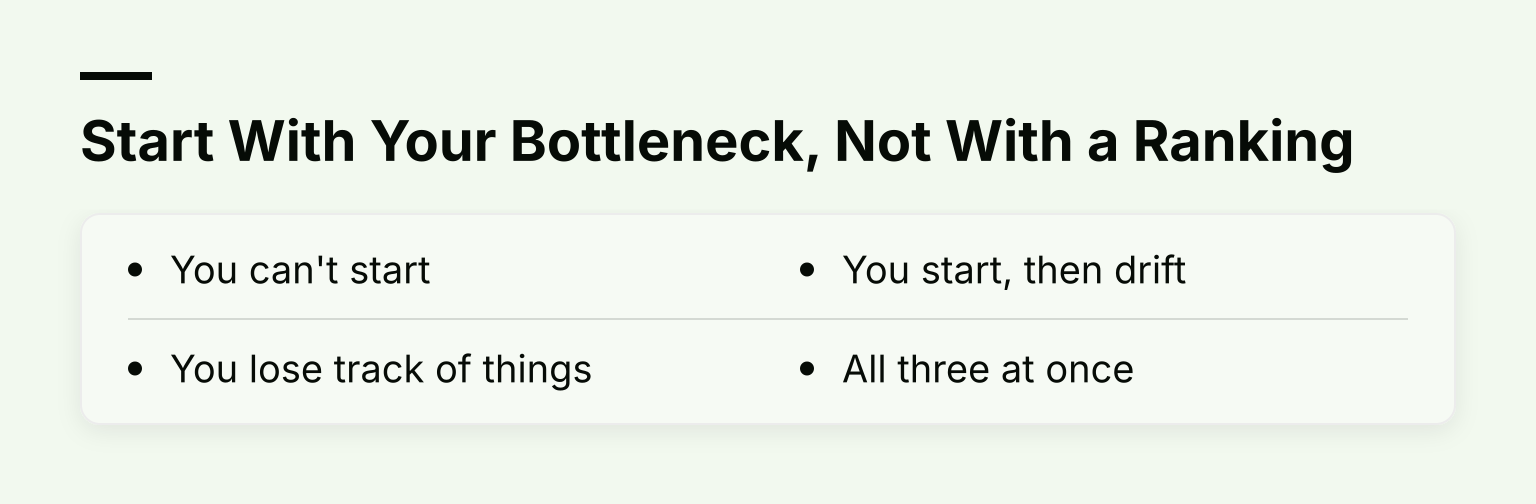
- You can't start. The task list is fine; the problem is opening Instagram instead. You need focus blocking.
- You lose track of things. You remember obligations at 11 p.m. You need a task manager.
- You start, then drift. New systems last a week. You need habit tracking with visible streaks.
- All three at once. That is the most common student pattern, and it is the one case where a single all-in-one app usually beats three separate ones.
If focus is your only issue, our guide to the best focus apps for iPhone goes deeper on that single job. If you want harder enforcement than a timer, see our app locker app for iPhone guide.
The Shortlist at a Glance
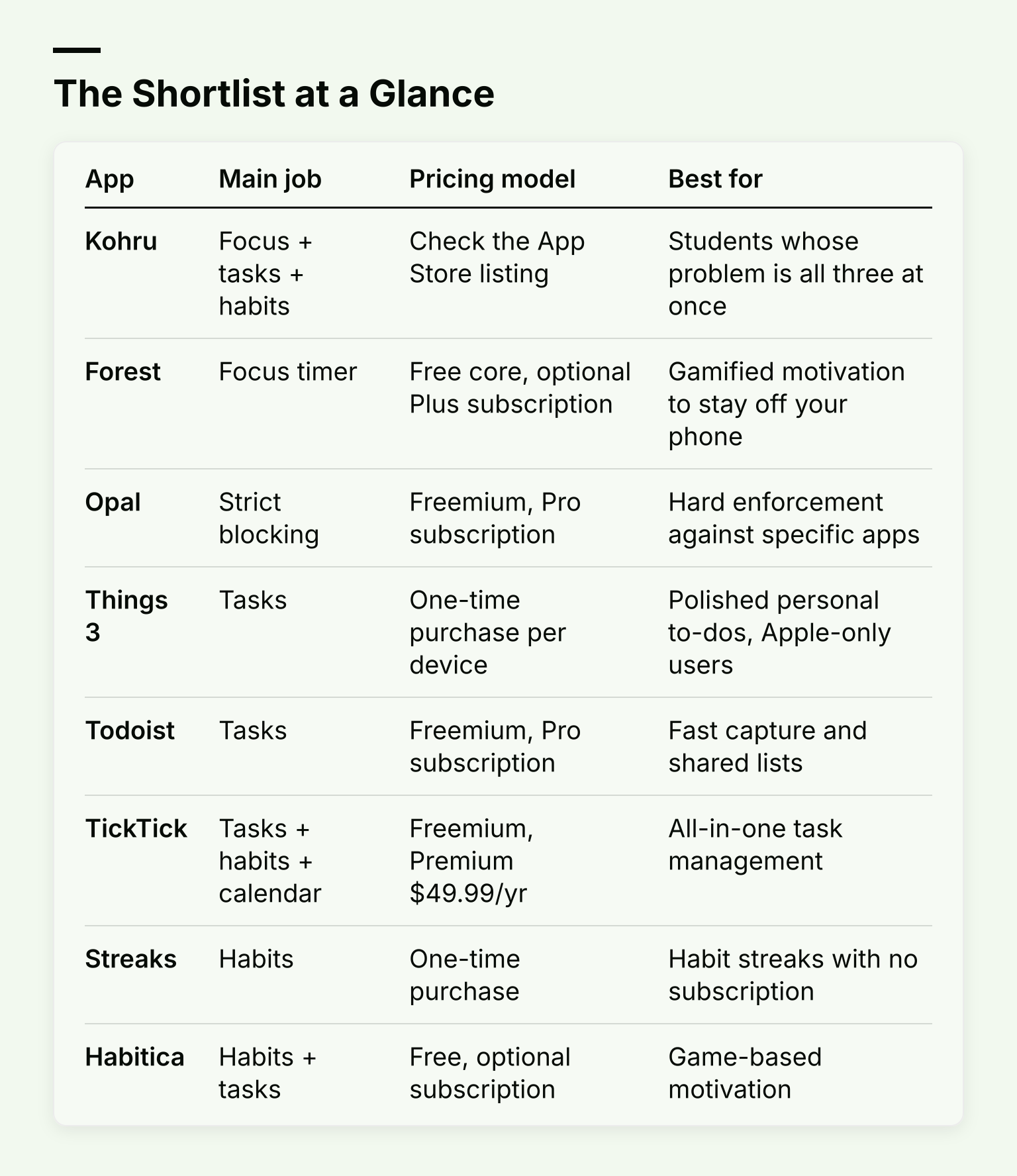
| App |
Main job |
Pricing model |
Best for |
| Kohru |
Focus + tasks + habits |
Check the App Store listing |
Students whose problem is all three at once |
| Forest |
Focus timer |
Free core, optional Plus subscription |
Gamified motivation to stay off your phone |
| Opal |
Strict blocking |
Freemium, Pro subscription |
Hard enforcement against specific apps |
| Things 3 |
Tasks |
One-time purchase per device |
Polished personal to-dos, Apple-only users |
| Todoist |
Tasks |
Freemium, Pro subscription |
Fast capture and shared lists |
| TickTick |
Tasks + habits + calendar |
Freemium, Premium $49.99/yr |
All-in-one task management |
| Streaks |
Habits |
One-time purchase |
Habit streaks with no subscription |
| Habitica |
Habits + tasks |
Free, optional subscription |
Game-based motivation |
Kohru: One App for Focus, Tasks and Habits
Most productivity advice assumes your problem is one thing. For a lot of students it is a loop: you procrastinate on a task, escape into your phone, feel behind, and lose the habit of studying entirely. Breaking that loop with three separate apps means three subscriptions and three systems to maintain.
Kohru is built for that loop. It blocks distracting apps and websites across your phone, your laptop, and Chrome through a browser extension, so the block follows you when you switch devices mid-study. You can turn tasks from your Work and Personal lists into focus sessions, so the thing you avoid and the thing that protects you from distraction are in the same place. It also tracks habits, focus time, completed tasks and progress, which helps if you respond to visible streaks. Kohru is designed with attention-regulation and task-initiation challenges in mind, including ADHD, which shows up in how little friction there is between opening the app and starting a session.
Honest tradeoff: Kohru is not a project management suite. If your main need is shared team boards or deep reporting, a dedicated task manager fits better. Check the App Store listing for current pricing, since we do not state it here.
If your bottleneck is really just one of the three jobs, the best-in-class single-job apps below may fit better. That is the fair comparison, and we will make it.
Focus Blocking
Forest: a Focus Timer With Stakes
Forest is a Pomodoro-style timer with a twist: pick a session length, plant a virtual tree, and leave the app, and the tree dies. Finished sessions grow a forest that becomes a visible record of your focus time. Its core experience is free with no time limit, including the focus timer, app blocking in Deep Focus mode, and group focus rooms, according to Forest's plans page. An optional Plus subscription unlocks extras like a custom app allowlist and focus analytics, with pricing that varies by region, so check the App Store for your local price.
Best for: people who need a reason not to unlock their phone, not a fortress around it. Limit: Forest's free tier shows occasional ads outside focus sessions, and it does not organize tasks or track habits.
Opal: Strict Blocking With Real Teeth
Opal takes the opposite approach: instead of motivating you to stay off your phone, it makes leaving a block session hard. Its Pro tier includes Hard Mode, which the company describes as letting you set rules you cannot cancel or take a break from, plus an Allow List that blocks everything except chosen apps, according to Opal's help center. The free version gives you a small number of recurring rules, unlimited immediate timers, and a daily focus score.
Best for: heavy users of one or two apps, like TikTok or YouTube Shorts, who keep disabling softer blockers. Limit: the free tier's rule count runs out fast if you want separate daytime and evening schedules, and Pro is a paid subscription, so check Opal's site for current prices before committing.
Task Management
Things 3: The Polished Personal To-Do App
Things 3 from Cultured Code is the app people mean when they say an app "feels like Apple designed it." It is a one-time purchase with no subscription, and it syncs your to-dos across devices through the company's free Things Cloud, according to Cultured Code's support page.
Best for: managing your own work and study tasks with minimal fuss. Limit: it is Apple-only, sold separately per platform (Mac, iPhone, iPad are separate purchases), and there is no iPhone free trial because one-time-purchase apps cannot offer one. If you also use Windows or Android at school or work, that is a real risk of losing your history. Check the App Store for the current price of each version.
Todoist: Fast Capture and Easy Sharing
Todoist is the quickest app for getting a task out of your head: type, pick a date with natural language like "every Monday," done. It also handles shared lists well, which matters for group projects. The free Beginner plan includes 5 personal projects, reminders, and flexible list and board layouts; Pro costs $7 per month or $60 per year, with a 7-day free trial, according to Todoist's pricing page.
Best for: students juggling personal tasks plus group work. Limit: the 5-project free cap is the first wall you hit, and features like the calendar layout are paid.
TickTick: Tasks, Habits and Calendar in One
TickTick quietly does three jobs: tasks with a Kanban board, a calendar view, and a built-in habit tracker. The free plan includes 9 lists, 99 tasks per list, reminders and cross-platform sync; Premium is $49.99 per year and raises those limits while adding multiple calendar views, according to TickTick's upgrade page. There is also a 25% education discount for eligible students and teachers.
Best for: people who want one subscription covering tasks and light habit tracking. Limit: the free tier's 5-habit cap is tight, and its interface is busier than Things 3's.
Habit Tracking
Streaks: One-Time Purchase, No Subscription
Streaks is a habit tracker from Crunchy Bagel that has won an Apple Design Award. You pick up to 24 habits, and each day you complete one, your streak grows. It integrates with Apple Health so tasks like step goals tick themselves off, syncs through iCloud, and works on iPhone, iPad, Apple Watch, Mac and Apple Vision Pro from a single purchase, according to Streaks' site and its App Store listing, which lists it at $5.99 with no subscription and no ads.
Best for: building habits without another monthly bill. Limit: it tracks habits, not tasks, and it is Apple-only.
Habitica: Turn Your Habits Into a Game
Habitica treats your real life like a retro role-playing game: check off a task, earn gold and experience, level up your avatar; miss a daily, take damage. It is free to play, and the company describes its optional subscriptions (from $4.99 per month up to $47.99 per year) as support perks rather than requirements, according to its App Store listing.
Best for: people who find streaks boring but games motivating, and for group accountability with friends. Limit: the game layer adds setup overhead, and it will feel silly if you are not the type.
The Free iOS Baseline: What Your iPhone Already Does
Before paying for anything, check what Apple gives you free:
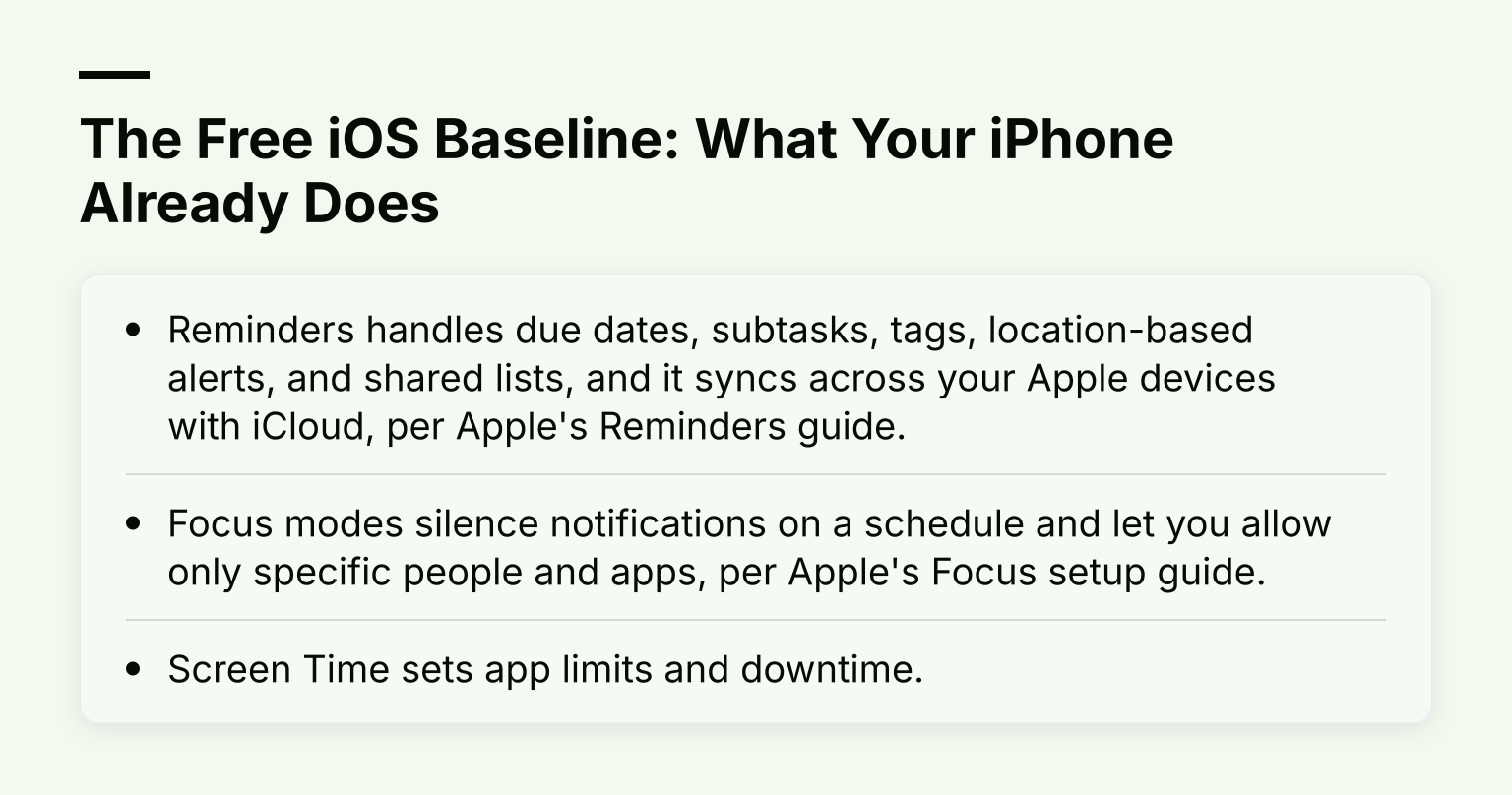
- Reminders handles due dates, subtasks, tags, location-based alerts, and shared lists, and it syncs across your Apple devices with iCloud, per Apple's Reminders guide.
- Focus modes silence notifications on a schedule and let you allow only specific people and apps, per Apple's Focus setup guide.
- Screen Time sets app limits and downtime.
The catch: these tools rely on your willpower to keep them configured and to not tap "Ignore Limit." They are a fair test, though. If built-in Screen Time limits keep failing, that failure is your data: you need third-party blocking with harder enforcement.
Pricing Models: What Each One Actually Buys You
- One-time purchase (Things 3, Streaks): pay once per platform, own it. Best if you hate subscriptions. Downside: Apple-only apps here risk losing your history if you ever leave the ecosystem, and no free trial on the iPhone versions.
- Freemium (Todoist, TickTick, Forest, Opal): the free tier is a real product, not a demo, but caps like Todoist's 5 projects or Opal's few rules are designed to nudge you into paying. Read the cap list before you invest weeks of setup.
- Subscription (Opal Pro, TickTick Premium, Forest Plus): ongoing cost buys ongoing development. Ask whether the paid features solve your specific bottleneck or just add polish.
Trial One App for One Real Week
Setup-day enthusiasm lies. A messy week does not. Before committing to any app on this list:
- Put your real commitments in it, including the ones you are avoiding.
- Add one task that is late already, and one that changes priority mid-week.
- Notice whether you open the app without being reminded. That instinct is the real product.
- Check the pricing page on the vendor's own site before any subscription renews, since app paywalls and website prices can differ.
If the week goes badly, drop it guilt-free and try the next one. Three one-week trials cost less than three unused subscriptions.
FAQ
Do I need multiple productivity apps? Usually no. One good task manager plus your iPhone's built-in Focus modes covers most students. Add a dedicated blocker only if distraction is your confirmed bottleneck.
Which iPhone productivity app is best for students with ADHD? Look for low friction between opening the app and starting work, visible progress tracking, and distraction blocking. Kohru is built around task initiation and ADHD support; the comparison in our ADHD management app guide covers that decision in depth.
Are paid productivity apps worth it? A subscription you actually use beats three free apps you abandon. Judge by one real week of use, not features on a pricing page.
The Bottom Line
Pick by bottleneck. Can't start: Forest for gentle pressure or Opal for hard enforcement. Drowning in tasks: Things 3 for polish, Todoist for speed and sharing. Habits fading: Streaks if you want to pay once, Habitica if games move you. And if your honest answer is "all three at once," that is exactly the loop Kohru is built to break: block distractions on your phone and laptop, turn your tasks into focus sessions, and watch your habits and focus time stack up. Try it for one real week and see if the loop closes.
For per-app detail on the broader task, focus and time-management family, our earlier 10 Best iPhone Apps for Productivity roundup and 10 Best Productivity App iOS picks are useful next reads.
