The best focus app for iPhone isn't automatically the one with the longest feature list. If you lose focus because you open Instagram without thinking, you need a pause before access. If your phone pulls you away from work, you need firm app and website blocking. Students may respond better to a visible reward, while remote workers often need the same block to apply across an iPhone and a laptop.
That distinction matters because awareness of digital wellbeing tools is much higher than consistent use. A 2023 study of digital wellbeing applications found that 80.48% of respondents knew about these apps, but only 36.94% used them occasionally or regularly. Native tools also have reach. Airship's consumer research reported that 56% of iPhone users had used Apple's built-in Focus feature.
This ranking focuses on the problem each app solves, including enforcement, cross-device coverage, friction, habit support, study value, social accountability, iPhone usability, and pricing transparency. Check each current App Store listing or product site before subscribing, because the supplied research doesn't provide current plan prices.
Table of Contents
- 1. Kohru for turning tasks into cross-device focus sessions
- 2. Opal for polished iPhone-first blocking
- 3. Freedom for blocking distractions across your devices
- 4. Forest for gamified study sprints
- 5. one sec for interrupting automatic checking
- 6. Flipd for social accountability
- 7. Brain.fm for focus audio
- Top 7 iPhone Focus Apps Comparison
- Choose the App That Matches Your Focus Failure
1. Kohru for turning tasks into cross-device focus sessions
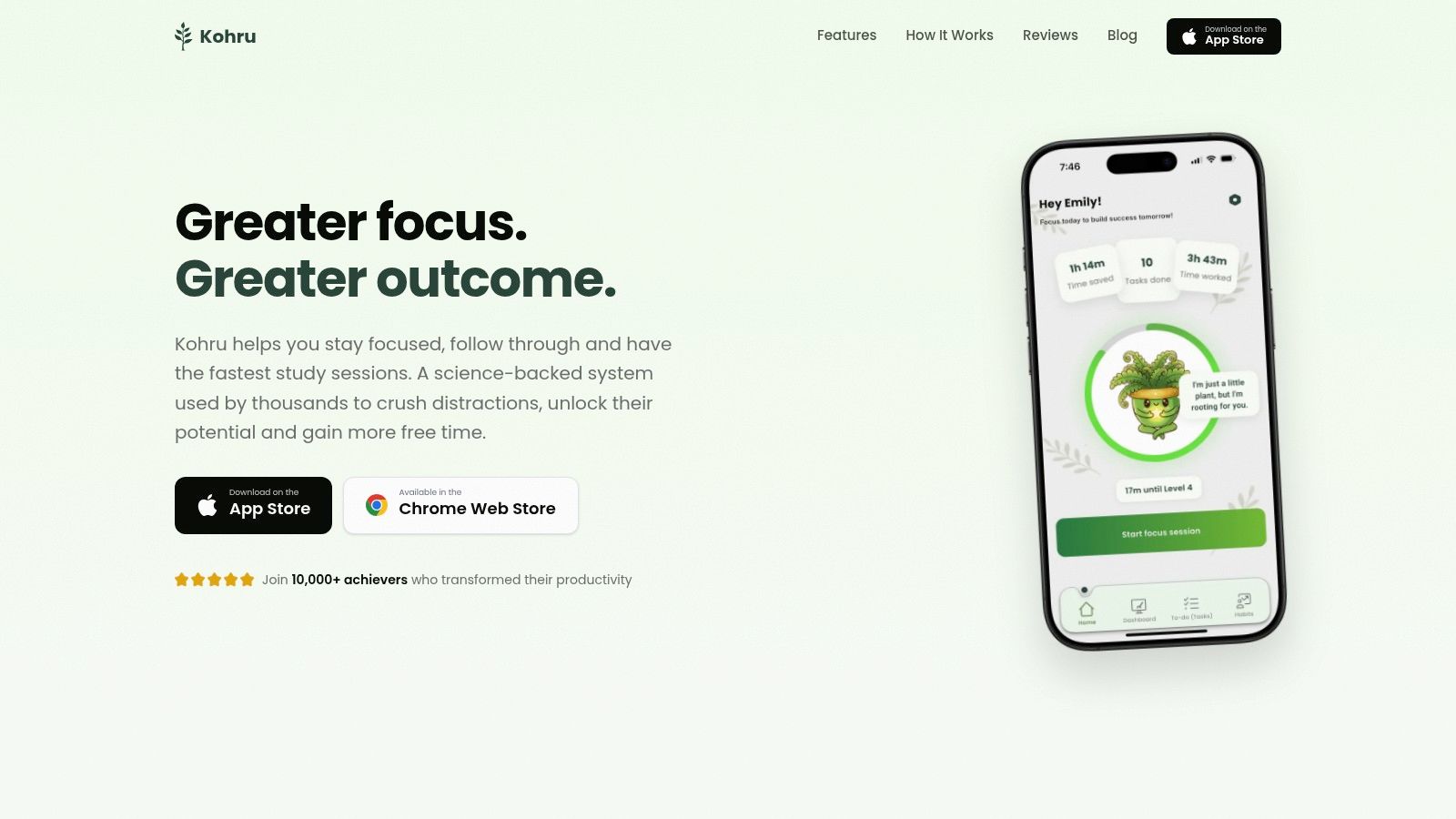
Kohru is the strongest choice for people who don't just need to block distractions, but need a fast path from task selection to sustained work. Its iPhone app and Chrome extension let you start a Focus Session that blocks distracting apps and websites across your phone and laptop. That cross-device link matters if you can resist TikTok on your iPhone but immediately switch to a browser tab on your computer.
The app's Smart To-Do Lists separate Work and Personal tasks, then turn individual tasks into distraction-free sessions. Instead of opening a generic timer and deciding what to do afterward, you can choose the next concrete task and begin. Custom durations, difficulty modes, timed breaks, and a one-click start make the workflow practical for study blocks, writing, research, and office work.
Kohru also takes a less brittle approach to habit building. Its Habit Tracking uses flexible weekly targets and motivational cues rather than relying only on a perfect daily streak. The dashboard keeps progress visible through focus time saved, completed tasks, and built streaks. The product site says Kohru is used by 10,000+ achievers, and its user feedback emphasizes faster study sessions, retention, and reliable blocking. Treat those as product-level social proof, not as an independent performance study.
Why Kohru stands out
Practical rule: Choose Kohru when your distraction problem starts before the work session, with vague priorities, and continues across both your phone and browser.
The main limitation is coverage. Kohru is currently iOS-first, with Android listed as coming soon, and laptop blocking depends on the Chrome extension rather than a native macOS or Windows desktop application. That makes it a strong fit for iPhone users who work in Chrome, but less suitable for households or teams that need a fully native experience on every operating system.
Test it with one real task, not a theoretical routine. Add a piece of work you've been postponing, start a Focus Session from the task list, open your usual distracting sites on the laptop, and check whether the block covers the exact workflow you need. Review current availability and in-app purchase details through the App Store before subscribing.
2. Opal for polished iPhone-first blocking
Opal is the best fit for iPhone users who want fast, polished blocking with adjustable resistance. It uses Apple's Screen Time framework and web extensions to block selected apps and websites during scheduled or on-demand sessions. You can create rules for particular times, trigger them through Apple Focus filters, or start a session when you need immediate protection from distractions.
Its useful distinction is Focus Difficulty. A basic block may be enough when you're mildly distracted, while a more demanding setting adds friction before you can bypass the session. That makes Opal more flexible than a timer that just counts down while the distracting app remains available.
Opal also provides analytics and focus feedback, helping you identify whether your problem is concentrated in social apps, browsing, or repeated short interruptions. Its iPhone-first design keeps setup relatively direct, and its official Opal site shows an actively maintained product with ongoing updates.
Where Opal's limits matter
Opal's enforcement still depends on Apple's Screen Time and related system frameworks. That means determined users may find edge-case workarounds, and an iOS update can require you to retune part of your setup. Users who frequently change devices or rules should expect occasional maintenance rather than treating the configuration as permanent.
Pick Opal if you want phone-based enforcement first, especially around scheduled work hours or study sessions. Start with your highest-risk apps, connect the session to an Apple Focus mode, and test whether the selected difficulty creates enough resistance to stop reflexive openings. If you keep bypassing it, move to a stricter blocker instead of endlessly adjusting the timer.
3. Freedom for blocking distractions across your devices
Freedom solves the most obvious cross-device problem: you block a site on the iPhone, then open it on a laptop five seconds later. Its unified sessions cover iPhone, iPad, Mac, Windows, Android, and Chromebooks, allowing one account to coordinate distractions across a mixed-device setup. For professionals, students, and remote workers who move between screens, that broad coverage is its central advantage.
You can create custom blocklists for social media, news, shopping, video, or any other sites that interrupt work. Freedom also supports scheduled sessions and allow-list exceptions, including a mode that blocks all websites except the ones you explicitly need. That's useful for research sessions where you want access to a small set of sources without leaving the entire web open.
The trade-off is that Freedom isn't a perfect escape from iOS constraints. Its iPhone app blocking inherits Apple Screen Time limits, while website blocking uses a VPN-based approach. Someone committed to defeating their own block may still find a workaround, particularly if they control every device setting.
Best workflow for Freedom
Build separate lists instead of one enormous blocklist. A “deep work” list might contain social feeds and entertainment sites, while a “writing” list could allow research sources but block video and shopping. Schedule the session only after checking that essential work apps and communication tools remain available.
Freedom is the clear recommendation when device variety matters more than a minimalist iPhone experience. Use it for a week across your actual phone and computer routine. If the block catches the distractions on both screens without interfering with necessary work, its broader coverage is doing something a phone-only blocker can't.
4. Forest for gamified study sprints
Forest is a timer that makes focus visible. Start a session and a virtual tree grows while you stay away from distracting apps. Leave early, and the tree withers. That simple consequence gives students a reason to protect a short study sprint without requiring a complicated productivity system.
The app supports gamified sessions, unlockable species, challenges, shared planting, and co-planting. Those social features make Forest especially useful when a friend, classmate, or study group is also trying to work. On iPhone, its allow-list-based blocking and Time Guard features can create phone-free windows, while Apple Health integration can record focus activity.
Forest is not the right pick for someone who needs aggressive enforcement. Its blocking is lighter than a dedicated blocker, and users who routinely override timers may find the virtual tree easy to abandon. It works better as a motivational layer than as a security barrier.
A timer helps you begin. A consequence you care about helps you stay.
Choose Forest for revision, reading, language practice, or short writing bursts where visible progress keeps you engaged. Start with a realistic session, use the allow list to preserve only essential tools, and invite a study partner when solo motivation isn't enough. If you leave the session to check the same app repeatedly, switch to Opal or Kohru for stronger control.
5. one sec for interrupting automatic checking
one sec targets the moment before distraction, not the entire device. When you try to open a selected app or website, it inserts a brief intervention with breathing animation and reflection prompts. You can then decide whether to continue. That pause interrupts the automatic sequence of pickup, tap, scroll, and regret.
This makes one sec the best choice for people who don't need a total lockout. ADHD users and other people who benefit from habit friction rather than hard prohibition may prefer a short interruption that creates awareness without making necessary access impossible. Per-app interventions, Safari website support, scheduled or manual blocks, Focus-filter integration, and Shortcuts automations allow you to target specific triggers.
The distinction is important. one sec is not a hard blocker, so it won't prevent access entirely. If you know you'll dismiss the prompt every time, you need Screen Time-based enforcement from an app such as Opal or Kohru instead.
How to test the pause
Choose one app that you open impulsively, not every possible distraction. Use the intervention during a normal work period and notice whether you cancel more openings or just approve them faster. If the pause changes your choice, expand it to another trigger. If it becomes background noise, increase enforcement elsewhere rather than adding more prompts.
The one sec product site lists availability across iOS, Android, and desktop browsers with Pro features. Check the current App Store or product pricing before committing.
6. Flipd for social accountability
Flipd is for learners who focus better when other people are visibly working too. Its live study rooms, groups, public productivity sessions, leaderboards, challenges, timers, streaks, and analytics create a community-based focus environment rather than a strict digital barrier.
That approach works well for students studying in parallel, university clubs, exam groups, and anyone who benefits from showing up at a scheduled time. You can join a room, start a timer, use background audio such as lofi sounds, and let the group context provide accountability. Apple Health integration adds another way to record sessions.
Flipd's limitation is central to the recommendation. Full hard-lock app hiding on iOS is no longer part of the main app because of Apple policy. Flipd therefore focuses on timers, community, and softer forms of blocking, not strict enforcement. Someone who wants to make Instagram inaccessible during a writing session should use a dedicated blocker instead.
Use Flipd when the commitment to other people matters more than technical resistance. Join a room for a specific assignment, keep the phone's own Screen Time limits available for high-risk apps, and compare your actual completion with solo sessions. The app is valuable when social presence gets you into the chair. It isn't a substitute for device-level blocking.
7. Brain.fm for focus audio
Brain.fm complements a focus system rather than replacing one. It provides task-based audio for Focus, Deep Work, and Study, with adaptive soundscapes designed to reduce the distraction that comes from choosing playlists or skipping songs. If silence feels uncomfortable and lyrical music pulls your attention toward the words, Brain.fm offers a more consistent alternative.
The iOS app supports sessions, and the service works across platforms. Its approach is informed by neuroscience and supported by published, peer-reviewed research, but the practical role remains straightforward: start the audio when you start the work, and use it as a repeatable environmental cue.
Brain.fm doesn't block apps, websites, or notifications. You can still open every distraction while the audio plays. It also requires an ongoing subscription if you rely on it every day, so it makes more sense as an audio layer alongside Kohru, Opal, Freedom, or Apple's own Focus tools.
Select a task-specific program, avoid changing tracks during the session, and pair the audio with the same desk or study routine. If you're still opening distracting apps, add a blocker. If the main problem is inconsistent sound and too much playlist choice, Brain.fm may be enough to improve the start of each session.
Top 7 iPhone Focus Apps Comparison
| App | Implementation complexity | Resource requirements | Expected outcomes | Ideal use cases | Key advantages |
|---|---|---|---|---|---|
| Kohru | Medium, iOS app + Chrome extension setup and custom lists | iOS device, Chrome browser extension, likely in‑app purchases/subscription | Faster deep-work session starts, measurable focus time and task completion | Students and professionals needing cross‑device timed sessions and task-driven focus | One‑click Focus Sessions, Smart To‑Do → immediate timed work, flexible habit tracking |
| Opal | Low–Medium, uses Apple Screen Time + web extensions, quick to start blocks | iPhone, web extensions, relies on Apple Screen Time framework | Reduced reflexive phone use and context-aware blocking | iPhone users who want polished, flexible phone blocking integrated with Focus | Fast session start, Focus filter integration, friction ("difficulty") settings |
| Freedom | Medium, install and sync across multiple OSes, configure schedules | Apps/extensions on iOS, Android, macOS, Windows, Chrome; subscription likely | Unified cross‑device blocks and consistent schedules across devices | Users who want one account controlling phone and desktop blocks | True cross‑platform coverage, custom blocklists, mature support docs |
| Forest | Low, simple Pomodoro/timer setup and allow‑list configuration | iOS/Android apps, optional subscription for advanced features | Increased short‑sprint focus, visual motivation, social engagement | Students and users seeking gamified, low‑friction focus sessions | Gamified tree growth, co‑planting sessions, social challenges |
| one sec | Low, per‑app interventions; Shortcuts automations available | iOS (Safari support), optional Pro for cross‑device, uses Shortcuts for automations | Breaks automatic checking through brief pauses and reflection prompts | People with ADHD or those preferring friction over hard locks | Evidence‑informed micro‑pauses, per‑app interventions, lightweight setup |
| Flipd | Low–Medium, join rooms and start timers; community features to configure | Mobile app, account for groups, optional subscription for extras | Greater accountability, improved group study consistency and streaks | Learners, clubs, and study groups wanting live sessions and social accountability | Live study rooms, leaderboards, scheduled community events |
| Brain.fm | Low, select task‑based audio sessions in app | iOS/desktop app or web, subscription recommended, headphones suggested | Enhanced sustained attention and faster entry into flow (complementary) | Users who want audio-based focus support alongside blockers/timers | Neuroscience‑informed audio, peer‑reviewed research, task‑tuned soundscapes |
Choose the App That Matches Your Focus Failure
There isn't one universal winner among the best focus apps for iPhone. The right choice depends on whether you need enforcement, friction, structure, motivation, accountability, or a calmer environment.
Choose Kohru if you want task-to-session planning, flexible weekly habit targets, and distraction blocking across an iPhone and Chrome on your laptop. Choose Opal for polished iPhone-first blocking with adjustable difficulty and Apple Focus integration. Choose Freedom when your work spans iPhone, Mac, Windows, Android, or Chromebook and you want one coordinated system.
Students who respond to visible rewards should start with Forest, especially for short revision sprints or shared study sessions. If you repeatedly open apps without deciding to, choose one sec to interrupt the habit loop with a pause. If you work better when other people are present, Flipd offers live rooms and community accountability. Choose Brain.fm only as an audio companion, not as your blocker.
Use this setup process before paying:
- Name the main distraction: Decide whether the problem is a specific app, broad internet access, notifications, or an unplanned task list.
- Choose friction or enforcement: Use one sec for a pause, or choose Kohru, Opal, or Freedom when you need access restricted.
- Test one realistic session: Start with the length you can complete during a normal workday, not an ideal routine you'll abandon.
- Check desktop coverage: Confirm that the service blocks the browser, operating system, and devices you use.
- Review current pricing: Check the App Store listing or the product site before subscribing, since plans and in-app purchases can change.
Apple's built-in Screen Time can already show app-level usage, pickups, and limits, while third-party tools add stronger blocking, scheduled sessions, or habit friction. That means you shouldn't pay for another timer just because it looks more polished. Test the smallest tool that addresses your real failure, then upgrade only when the missing enforcement or structure is clear. On rest days, you can also protect recovery by following a balanced practical fitness approach on rest days rather than treating every day as a maximum-output day.
Kohru combines one-click iPhone Focus Sessions, task-based planning, flexible habit targets, and distraction blocking across your phone and Chrome browser. If you want a focus app that connects what you need to do with the barriers that keep you from doing it, visit Kohru and test it with one real study or work session.
