You sit down to study, open your laptop, and promise yourself you'll stay focused. A notification appears. Someone walks past the room. You remember an unanswered message, check one tab, then another, and suddenly the session has dissolved into fragments. The problem isn't that you're lazy or incapable of concentrating. Your distraction free study environment is sending too many competing signals.
A productive setup doesn't depend on heroic self-control. It controls the room, the device, the task, and the recovery cycle so your attention has fewer places to escape. The practical question is simple: what keeps pulling you away, and what can you redesign before the next session?
Table of Contents
- Why Your Study Space Keeps Breaking Your Focus
- Designing the Physical Study Zone
- Blocking Digital Distractions in Layers
- Break Schedules That Protect Deep Focus
- Daily Routines and Habit Cues That Hold It Together
- Putting It All Together With Kohru
- Your First Week of Distraction Free Study
Why Your Study Space Keeps Breaking Your Focus
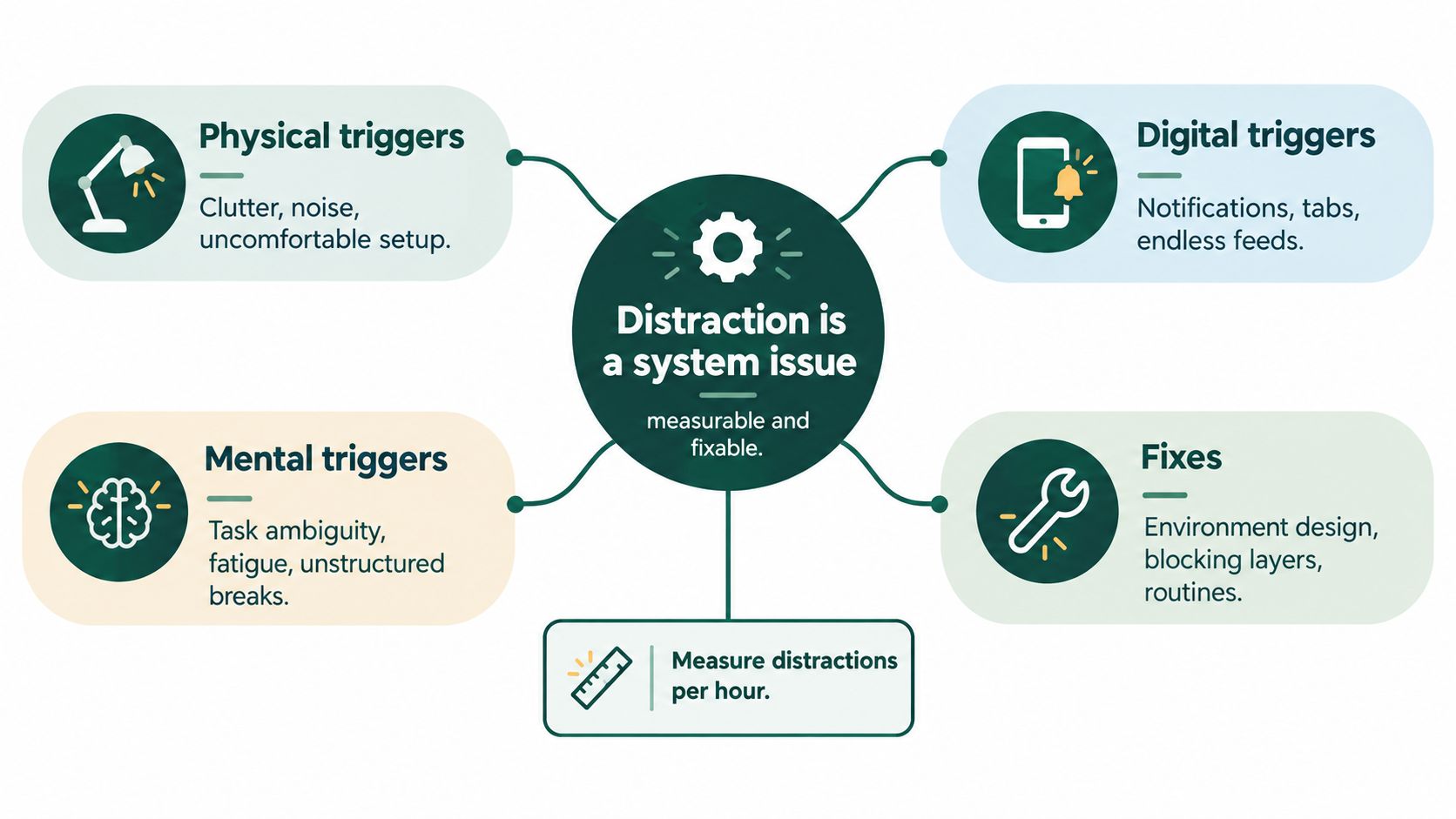
You sit down with a phone nearby, several tabs open, unclear instructions, and less energy than you expected. A notification lands, a sound pulls your eyes away, and one quick check becomes a broken study session. Blaming yourself misses the actual issue. Distraction is an engineering problem with measurable inputs, including cognitive load, energy, and environmental design.
A foundational study of 260 middle school, high school, and university students found that participants studied for less than 6 minutes on average during a 15-minute session before switching tasks. Technology distractions and self-interruptions led the list, as summarized by the American Psychological Association's overview of productivity and attention. The practical lesson is clear: an unsuitable environment can interrupt learning before you build enough momentum to understand the material.
Find the trigger instead of judging yourself
Track your next session for a few minutes. Each time your eyes leave the page or screen, record what caused it:
- Physical: noise, clutter, temperature, movement, or an uncomfortable seat.
- Digital: notifications, open tabs, messaging apps, feeds, or email.
- Mental: unclear instructions, fatigue, anxiety, hunger, or the urge to multitask.
That quick log turns “I can't focus” into a setup you can debug. A sound-triggered interruption calls for acoustic changes. A browser-triggered interruption calls for site blocking. If demanding work becomes difficult at a predictable time, shorten the session or move that work to a stronger energy window.
Attention has a recovery cost
An interruption continues costing attention after you return to the page. Research summarized by the University of Texas McCombs School of Business reports that interruptions can consume about 28% of the average workday, while returning to prior focus can take 15 to 23 minutes. The same source describes attention measures ranging from roughly 2.5 minutes on a screen-based task before switching to about 40 seconds for some measures and around 10.5 minutes per project before a switch.
Build a funnel around your attention. Reduce sensory competition in the physical zone, remove temptation through layered digital controls, schedule recovery before fatigue takes over, and use routines that make starting automatic. Kohru brings those controls into one app, so the study system supports your energy and attention instead of relying on willpower alone.
Designing the Physical Study Zone
Your desk is a sensory control panel, not a decoration project. Every visible object, sound, light source, and uncomfortable posture asks your brain to make another decision. Remove those decisions before you begin.
Start with the sightline. Put the desk where the door sits in peripheral view rather than directly in front of you, and avoid a window that looks onto heavy foot traffic. Keep only the materials for the current task in view. A notebook, required book, pen, water, and laptop may be enough.
Tune the room in the right order
Light first. Use bright task lighting aimed from the side or above, without glare on the screen. A dim room encourages sluggishness, while harsh glare creates physical strain that competes with reading.
Sound next. Background speech is especially disruptive, and one student soundscape study found that concentration was reported as optimal around 40 to 50 dB, while both overly quiet and overly loud conditions reduced performance. The findings are detailed in this study of soundscapes and student concentration. Treat the range as a testing point, not a universal command. Try silence for dense reading, controlled masking for routine work, and headphones when conversations keep breaking your train of thought.
Posture matters. Choose a chair that lets your feet rest flat and your hips stay close to a right angle. If your shoulders, neck, or lower back keep demanding attention, your study block is already compromised.
A plant can soften a sterile desk without adding much visual noise. If you want to choose one deliberately, use this guide to best desk plants for work, then keep the selection restrained. One purposeful object beats a crowded shelf.
Physical Zone Setup Checklist
| Element | Target | Why It Matters |
|---|---|---|
| Desk position | Peripheral view of the door, limited foot traffic | Reduces visual interruptions |
| Lighting | Bright, even, glare-free task light | Supports alertness and comfortable reading |
| Sound | Test conditions around 40 to 50 dB | Masks speech without assuming total silence is best |
| Surface | Current materials only | Cuts visual decision-making |
| Chair | Feet flat, supported upright posture | Prevents discomfort from competing with study |
| Start cue | Mug, lamp, mat, or consistent setup | Signals the beginning of the session |
Use this short visual guide to setting up a study environment as a prompt, but don't turn setup into procrastination. The physical zone is ready when it supports the task, not when it looks perfect.
Blocking Digital Distractions in Layers
One blocker fails because digital distraction has several entry points. A notification can pull you out before you start, an open tab can tempt you during the session, and your phone can create a second stream of attention even when the laptop is controlled.
Build the stack gradually.
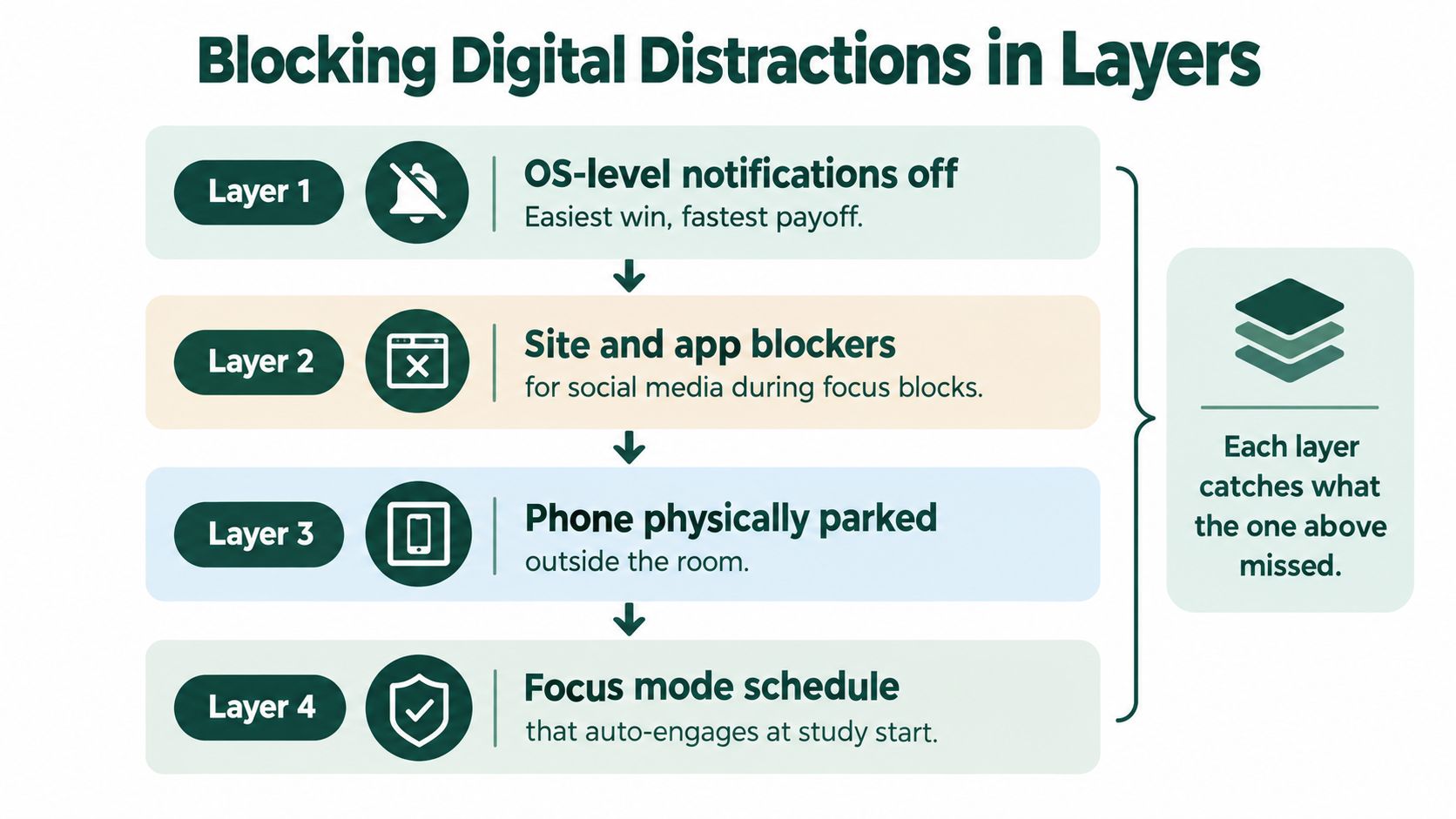
Layer one removes the noise
Disable non-essential notifications at the operating-system level. Don't rely only on individual app settings, because overlooked permissions and updates can reopen gaps. Keep calls or messages from important contacts available if your circumstances require it, but remove badges, banners, promotional alerts, and social activity.
This is your all-day baseline. It should reduce noise without making normal communication impossible.
Layer two blocks the obvious exits
During a declared study session, block the exact messaging, social, entertainment, and video sites that pull you away. Domain-level blocking is more useful than vague categories because you can name the destinations that derail you.
Park the phone outside the room when the work is demanding. Physical distance removes the reach-and-check loop that software alone may not stop.
If long screen sessions cause discomfort, adjust brightness, increase text size, and take visual breaks. For readers who want to explore eyewear options, this guide to reduce digital eye strain glasses offers context, but glasses won't solve an endless feed or a crowded browser.
Layer three reserves enforcement for hard work
Use an OS-level focus mode when you need a single app or tightly defined app group. Reserve the strongest setting for difficult writing, problem sets, or reading that requires sustained reasoning. Starting with an aggressive lockout can feel punitive, so begin with notifications, observe the leaks, then add site blocking and stronger focus controls.
Research on distraction and procrastination links unrestricted internet access and multitasking with procrastination and lower academic performance, as discussed in this review of digital distraction and academic behavior. The practical rule is clear:
Build friction in stages. Make distraction inconvenient enough to interrupt the habit, but not so restrictive that you abandon the system.
Break Schedules That Protect Deep Focus
Treat breaks as deliberate recovery periods that keep attention from degrading while you continue working. The University of Texas summary of interruption and focus research explains why returning to focused work can take substantial time after an interruption. Schedule the pause, decide how you will spend it, and define the first action for your return. That structure separates recovery from an unplanned escape.
Match the interval to the task's cognitive load.
| System | Work / Break Interval | Best For | Common Mistake |
|---|---|---|---|
| Pomodoro | 25 minutes / 5 minutes | Flashcards, drills, short review | Turning every break into phone scrolling |
| 52-17 | 52 minutes / 17 minutes | Essay drafting, problem sets | Starting another demanding task during recovery |
| Ultradian | 90 minutes / 20 minutes | Research reading, design, complex synthesis | Extending the block after focus has clearly declined |
| Movement-only | Task-defined / brief movement | Shallow administration and routine sorting | Calling a context switch a break |
Pomodoro suits work with clear, repeatable units. A timer becomes disruptive when you are building an argument and your reasoning has finally become coherent. Use a longer block and a genuine recovery period for essays, complex problem sets, and synthesis.
Your energy cycle should guide the choice. Use shorter intervals when the material feels dense or your attention is already thin. Reserve longer blocks for demanding work during your strongest study window. Continuing after focus has clearly declined produces less useful work and makes the next session harder to start.
Use breaks to change your physical state and lower cognitive load. Stand up, drink water, walk, look away from the screen, or stretch. Social feeds and short videos add novelty, so returning to quiet study feels dull by comparison. Keep the phone out of reach.
Before restarting, write the next action and leave the relevant page open. Sit down, read that instruction, and begin. The handoff removes a new decision from the return and keeps the planned pause from becoming a separate distraction.
Daily Routines and Habit Cues That Hold It Together
A distraction free study environment becomes reliable when the day tells you what happens next. Motivation is a poor trigger because it changes with sleep, stress, and deadlines. A lamp switch, a cleared desk, a specific mug, or a short cue song is faster and more dependable.
Consider a realistic day.
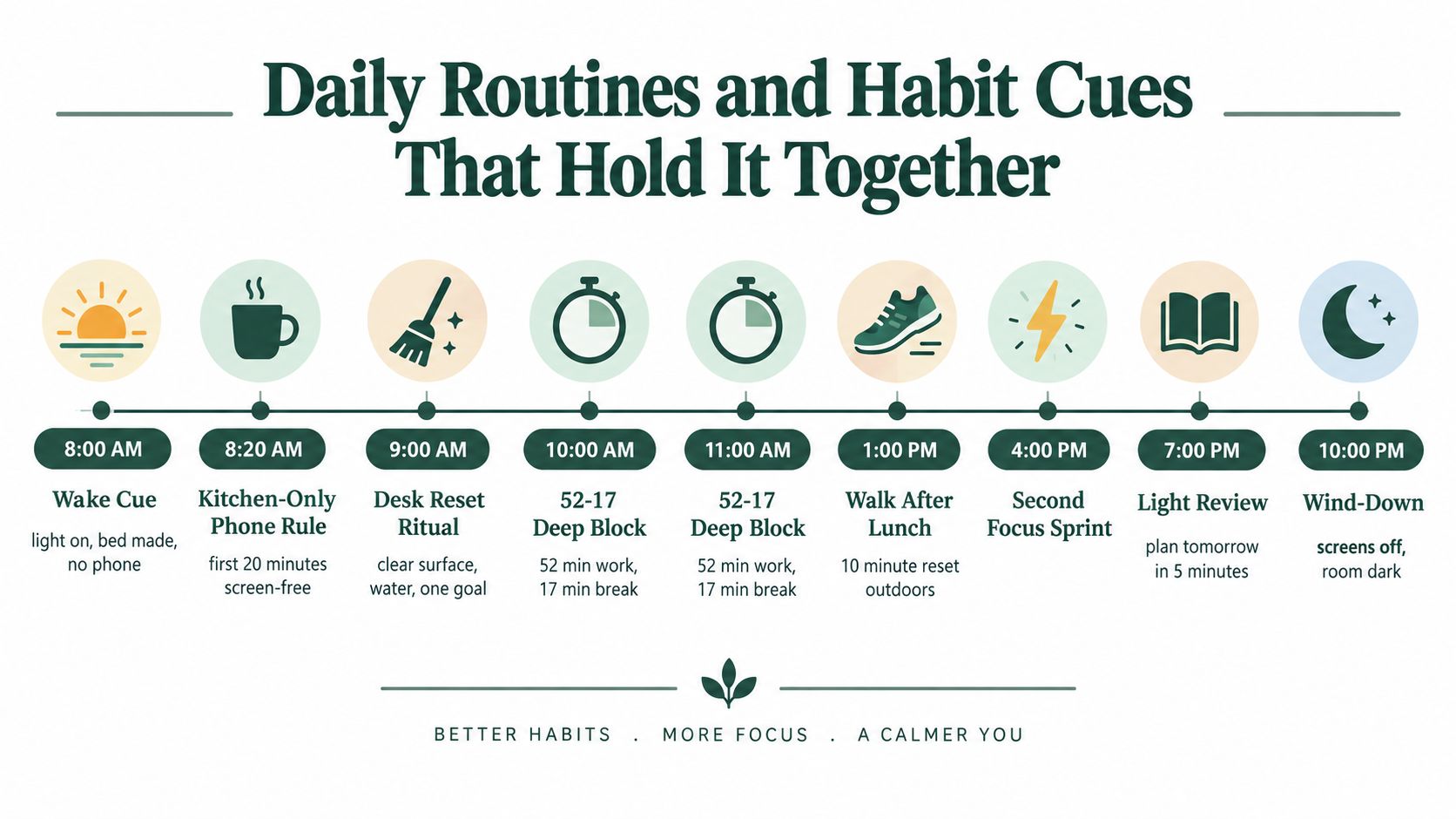
At 8 AM, the wake cue is simple: turn on the light, make the bed, and leave the phone in the kitchen. For the first 20 minutes, the phone stays there. At 8:20 AM, make coffee or tea without opening a feed. The mug becomes associated with beginning the day without immediate digital input.
At 9 AM, reset the desk. Clear the surface, fill the water bottle, write one outcome, and switch on the study lamp. The task must be concrete. “Study biology” is vague. “Summarize the next reading section and answer the review questions” gives your attention somewhere to go.
One day with fewer decisions
Use two 52-17 blocks before lunch for a problem set or essay. The first starts with the hardest item, and the 17-minute break includes movement rather than a screen. The second block continues the same work instead of introducing a new subject.
After lunch, walk outdoors to change posture and environment. In the afternoon, use one longer block for research reading if your energy supports it. In the evening, keep the demand lower with a short flashcard sprint and a five-minute plan for tomorrow.
At 10 PM, shut down. Close the tabs, put materials in their place, write tomorrow's first task, and turn off the study lamp. The room should now signal recovery rather than unfinished work.
Track the routine by recording whether the cue happened, whether the block started, and what interrupted it. Don't chase a perfect streak. Look for repeatable patterns.
The routine usually breaks in three places:
- Variable wake time: The first cue moves, so the entire day starts without a stable anchor.
- Skipped shutdown: Open tabs and unfinished decisions follow you into the evening.
- Bleeding blocks: One session runs into the next without a physical or mental transition.
Putting It All Together With Kohru
A distraction free study environment works when four layers support the same decision: the room reduces visual and physical friction, digital exits are closed, breaks match your energy, and each session leaves useful evidence. Kohru turns that design into a repeatable workflow rather than another list of settings to remember.
Start with a task that has a clear finish line. For example, create “Problem Set Ch. 4, 52 min” in Kohru, clear the desk, place the phone outside reach, and enable site blocking before you begin. Choose the break length that fits the work. A focused problem-solving block needs a different recovery period from routine review, so do not use one default for every subject.
The setup matters because cognitive load rises when you keep making small choices. Kohru holds the task, timer, blocked apps and websites, and break instruction in one active session across supported devices. Your physical rule still requires a prepared room, but the digital rule no longer depends on remembering which browser extension or phone setting to activate.
Use the end of the session as a diagnostic, not a celebration. Mark whether the intended questions were completed, then record the actual interruption: fatigue, noise, unclear instructions, or a tempting site. In the weekly habit view, compare completed focus blocks with the cue you used, such as the morning lamp or the shutdown ritual. That comparison tells you which part of the environment needs repair.
A loose stack of tools can handle each task separately, but it creates more switching, manual timer setup, and scattered records. Kohru's role is practical. It keeps the routine in one flow, while you remain responsible for preparing the room, choosing a workable task, and correcting the trigger that repeatedly breaks your focus.
Your First Week of Distraction Free Study
Don't try to install a perfect study environment in one afternoon. Maintain it through small tests, because your needs will change with the subject, time of day, noise level, and energy available.
Day one audits the real problem
Take a screenshot of your phone's screen-time summary. Measure the sound near your desk with a basic decibel app, and rate your energy at three points in the day using a consistent personal scale. Write down the single trigger that breaks focus most often.
You're not collecting data to create a research paper. You're identifying the first repair. If noise is the problem, don't begin by redesigning your task list. If the phone dominates the audit, don't spend the day buying desk accessories.
Days two and three fix the physical zone
Change the lighting if the room is dim or creates glare. Clear the sightline in front of the desk, remove non-study objects, and choose one chair for focused work. Put the phone in a fixed location outside the zone.
Then triage notifications on both phone and laptop. Keep only alerts that you need during study hours. Disable visual badges and sounds that invite checking.
Days four and five add the digital and break layers
Start with notifications off, then add site and app blocking during declared sessions. Choose one break cadence based on the task. Use a shorter rhythm for drills, a longer rhythm for writing or problem-solving, and a spacious block for demanding reading.
Run the timed session in Kohru so the block, break, and record live together. Afterward, write one sentence about the main interruption. Don't judge the result. Improve the next session.
Days six and seven make the system repeatable
On Day 6, add a morning cue and a shutdown ritual. Use the same lamp, mug, or desk reset each time. End by closing tabs and writing tomorrow's first action.
On Day 7, review three measures:
- Deep-work minutes: How much time did you spend on the intended task without an unplanned switch?
- Interruption count: Which triggers appeared, and which layer failed to catch them?
- Energy rating: When did demanding work feel easiest and hardest?
Use the review to adjust the system, not to punish yourself. A study environment should become more accurate over time. It may need different sound, session length, or digital restrictions for a research paper than for flashcards.
If your focus still collapses by 11 AM after the room and devices are controlled, inspect sleep, food, hydration, and caffeine timing before blaming the desk. Your environment can remove friction, but it can't compensate for every biological constraint.
Kohru brings protected focus sessions, cross-device distraction blocking, flexible break timing, and habit tracking into one study workflow. Set up your physical zone tomorrow, run your first structured session with Kohru, and use the weekly review to fix the specific trigger that keeps stealing your attention.
