
Sunday night has arrived. You have three tabs open, two half-finished problem sets, and a reading assignment you haven't started. You keep switching between them, hoping that movement will turn into progress, but the evening gets later while very little becomes complete.
Most students respond by buying a new planner or adding more calendar blocks. Those tools can help, but they won't solve the deeper problem if each block is filled with notifications, vague tasks, and constant switching. Time management for students is mainly a system for protecting useful attention, distributing practice, recovering energy, and noticing whether your plan matches reality.
Table of Contents
- Why Deadlines Slip Long Before the Due Date
- The Four Pillars of Student Time Management
- Building Your Weekly and Daily Study Templates
- Beating Procrastination When You Know It Matters
- Designing a Study Environment That Protects Attention
- Habit Tracking Without the Streak Trap
- Putting It All Together in Kohru
- Your 7-Day Kickoff Plan and Self-Audit
Why Deadlines Slip Long Before the Due Date
Monday morning, you open your laptop to write an essay. A message appears, so you check it. The course portal needs attention, a problem set comes to mind, and when you return to the essay, you have to reconstruct your place. The calendar still records an hour of study, but the hour has produced little finished work.
That gap between scheduled time and useful time explains many missed deadlines. In the peer-reviewed study on digital interruption costs, notifications disrupted attention even when students did not interact with their devices, while smartphone presence and alerts were associated with weaker sustained attention and information retention. An interruption is not only the few seconds spent looking at a screen. Working memory must rebuild the task, its context, and the next action.
Hours are not the whole measure
A student can spend an afternoon rereading notes while checking messages and retain less than someone who completes a shorter retrieval session with a clear target. The second student creates more chances to remember, explain, and apply the material. Study quality depends on what the brain has to do, not only on time marked as occupied.
Historical evidence adds useful context. Full-time students at four-year U.S. colleges studied approximately 24 hours per week in 1961, compared with about 14 hours per week in 2003, a decline of roughly 10 hours, or 42%, according to Philip Babcock and Mindy Marks' analysis summarized in this ERIC report. These figures do not show that every student studies too little, or that more hours automatically improve results. They show why a workable weekly allocation matters when study competes with employment, commuting, family responsibilities, social life, and digital entertainment.
The hidden emotional layer
A task may feel threatening, dull, confusing, or too large to begin. Delay then brings guilt, and guilt often produces an even more ambitious plan. The result is a cycle in which time management becomes self-criticism instead of adjustment.
A useful operating system treats time as something you protect and shape. It connects attention control, spaced practice, recovery, flexible planning, and external support. The same structure can serve a standard student, a neurodivergent student who needs stronger cues and smaller starts, or anyone using calendar reminders and study tools to reduce executive-function demands. A difficult week should require a clearer system, not perfect motivation.
The Four Pillars of Student Time Management
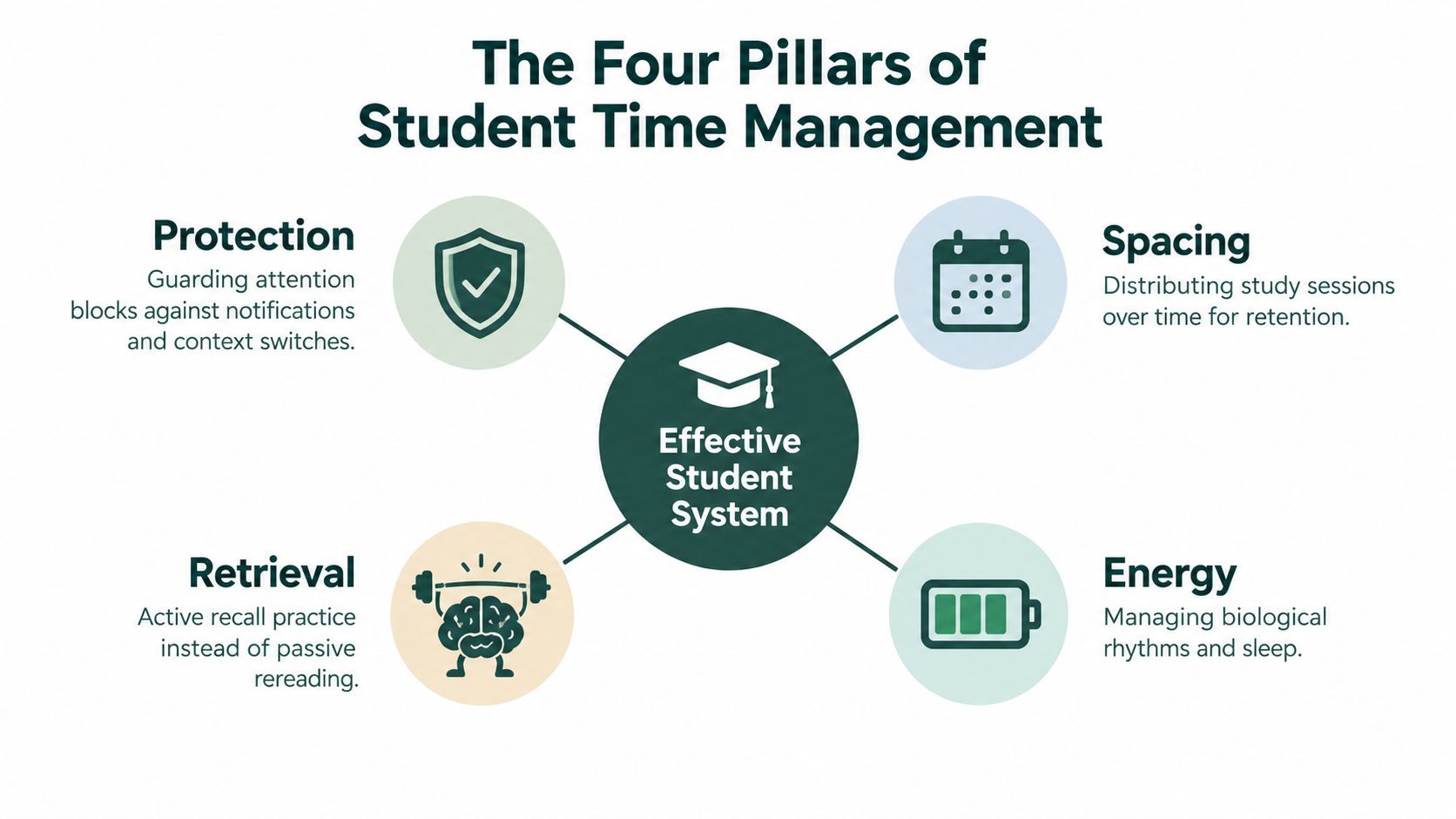
A reliable student system can be remembered with P-S-R-M, four connected pillars:
- Protection: Guard a study block from notifications, unnecessary tabs, and competing tasks.
- Spacing: Distribute learning across the available preparation window instead of placing everything before the exam.
- Recovery: Plan breaks, sleep, meals, movement, and a clear stopping point.
- Measurement: Record what you completed and what you learned, not only what you intended to do.
Protection comes first because an interrupted session can look productive while producing weak learning. Put the phone out of immediate reach, close unrelated tabs, and decide what “done” means before you begin. A useful block might end with a solved problem, a short explanation from memory, or an annotated page, rather than the vague promise to “study chemistry.”
Spacing turns plans into memory
Distributed practice works better for durable learning than massed study. A meta-analysis covering 63 studies and 112 effect sizes found a weighted mean effect size of 0.46 in favor of spaced practice, while a larger synthesis reviewed 317 experiments and 839 assessments and found that the best interval grows when the final assessment is farther away. These findings are summarized in the meta-analysis on distributed practice.
So a two-day practice problem shouldn't be solved only once. Try it, retrieve the method later without looking, and revisit it again after a longer gap. The important feature is retrieval across time, not a decorative calendar filled with equal study periods.
Recovery and measurement keep the system honest
Recovery isn't a reward you earn after finishing everything. It preserves the attention you need for the next session. End a block with a short walk, water, or a screen-free pause, and use a weekly review to identify which sessions took place.
Measurement should stay small. Count completed sessions, completed outputs, or review blocks. A weekly session count tells you more than a long list of intentions. Together, P-S-R-M creates a practical checklist: protect the block, space the practice, recover deliberately, and measure what occurred.
Building Your Weekly and Daily Study Templates
Start with the week, not the individual day. Add classes, labs, work shifts, appointments, caregiving, meals, and recovery windows to one calendar. What remains is your actual study capacity, not an imagined version of the week in which every open space becomes productive.
Place demanding subjects in periods when you usually have the clearest attention. Reserve lighter work, formatting, reading administration, or flashcard organization for lower-energy periods. Keep some unscheduled capacity for spillover, because a difficult problem or unexpected responsibility will eventually take longer than expected.
Build the weekly layer
Assign each course a small number of defined outputs. “Study biology” is too broad. “Retrieve the pathways from memory and correct the gaps” gives the session a direction.
Use the table as a starting template:
| Layer | Time Block | Purpose | Output |
|---|---|---|---|
| Weekly | Fixed commitments | Establish the real boundaries of the week | One complete view of obligations |
| Weekly | Subject study blocks | Distribute practice across courses | Assigned topic or problem set |
| Weekly | Review blocks | Retrieve older material before it fades | Questions answered from memory |
| Daily | Focus session | Complete the next meaningful action | Draft, solved problems, or notes |
| Daily | Recovery pause | Restore attention between efforts | Ready-to-start next action |
| Daily | Shutdown review | Close open loops | Progress logged and next step chosen |
Translate it into a day
A daily template needs only a few decisions:
- Begin with a short start ritual. Open the required document, write the first action, and remove unrelated material.
- Choose one most important task, or MIT. Make it concrete enough to begin without another planning session.
- Schedule additional blocks only after the MIT has a clear place.
- Define breaks before work starts. Walk, drink water, stretch, or sit away from the study screen.
- End with a brief shutdown review. Record what moved forward, what blocked you, and the next visible action.
Don't fill every minute. A missed session should be movable, not catastrophic. If your template has no room for delay, it isn't disciplined, it is brittle.
Beating Procrastination When You Know It Matters
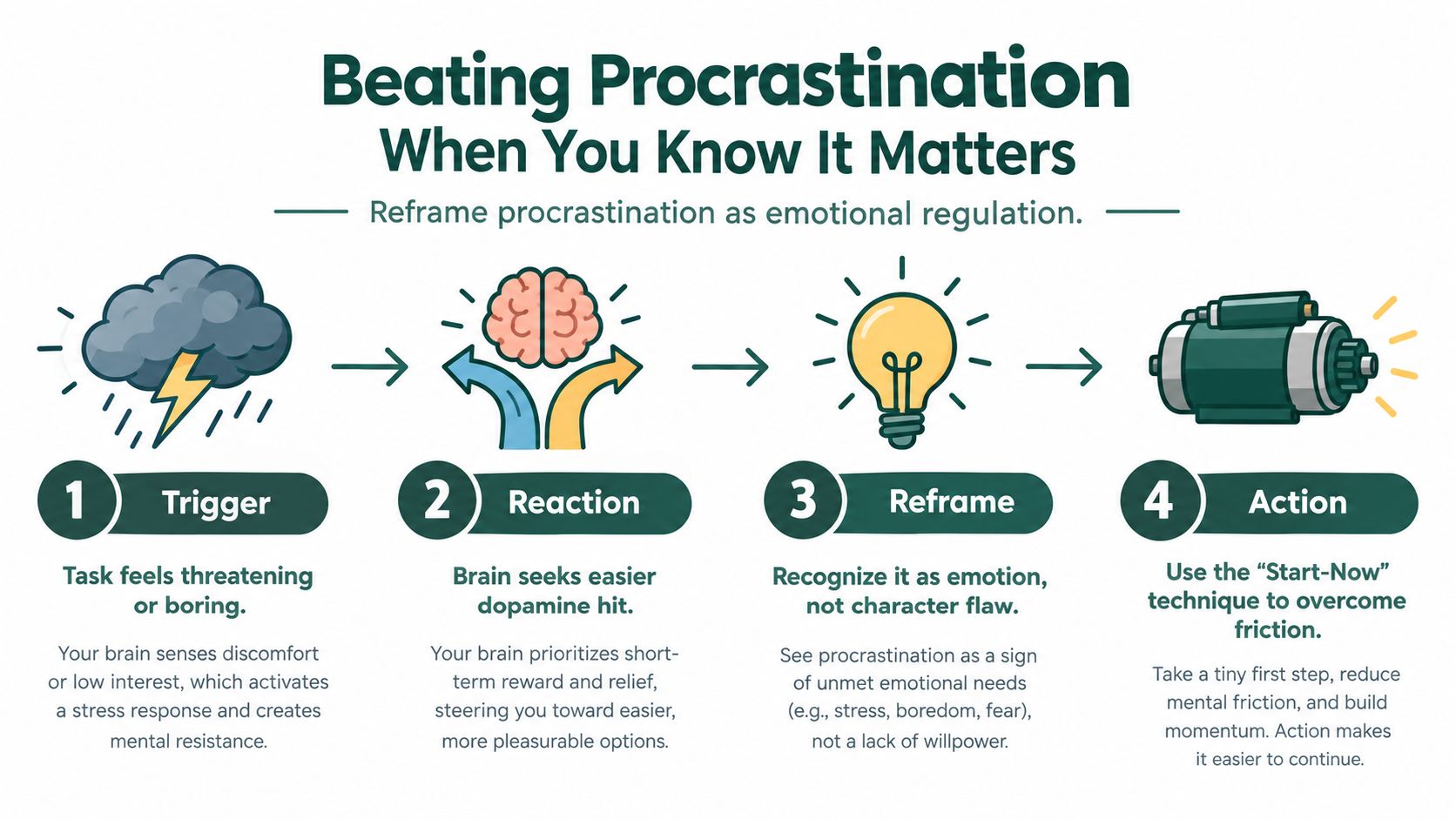
Procrastination usually isn't a simple refusal to work. A task may feel ambiguous, boring, exposing, or emotionally loaded, so your brain reaches for an easier source of stimulation. Calling yourself lazy adds shame without making the first step clearer.
The Start-Now Protocol reduces the emotional and practical cost of beginning:
- Shrink the task. Replace “read the article” with “open the article and identify the first heading.”
- Pair it with a pleasant cue. Use tea, a familiar study location, or quiet background sound, provided the cue doesn't become another distraction.
- Commit to a tiny minimum. The first commitment is to begin, not to promise an entire afternoon.
- Schedule the return. Before stopping, write the next action and decide when you'll resume.
Suppose you have a three-section reading assignment. “Finish the reading” creates a large, shapeless demand. Instead, open the document, write the three section headings in your notes, read the first paragraph, and record one question. In a few minutes, the task has a starting structure, and active reading can replace avoidance.
Students with ADHD-like executive-function difficulties may need more external support than a conventional calendar provides. A 2025 review of executive-function difficulties describes challenges involving working memory, cognitive flexibility, inhibitory control, task initiation, persistence, and organization. Use written sub-steps, visible next actions, body doubling, open materials, and adjustable session lengths. ADHD diagnosis is different from temporary attention problems caused by stress, sleep loss, or overload, so a flexible system should support the difficulty without making a diagnosis.
If anxiety is making academic tasks feel unsafe or impossible to approach, time planning may need to sit alongside appropriate mental-health support. Students in the Penticton area can explore treating anxiety in Penticton as one possible resource.
Designing a Study Environment That Protects Attention
A student can begin with a clear plan, then lose the session to one alert, an open tab, or a phone within reach. Protect attention by shaping the surroundings before fatigue and interruption make decisions harder.
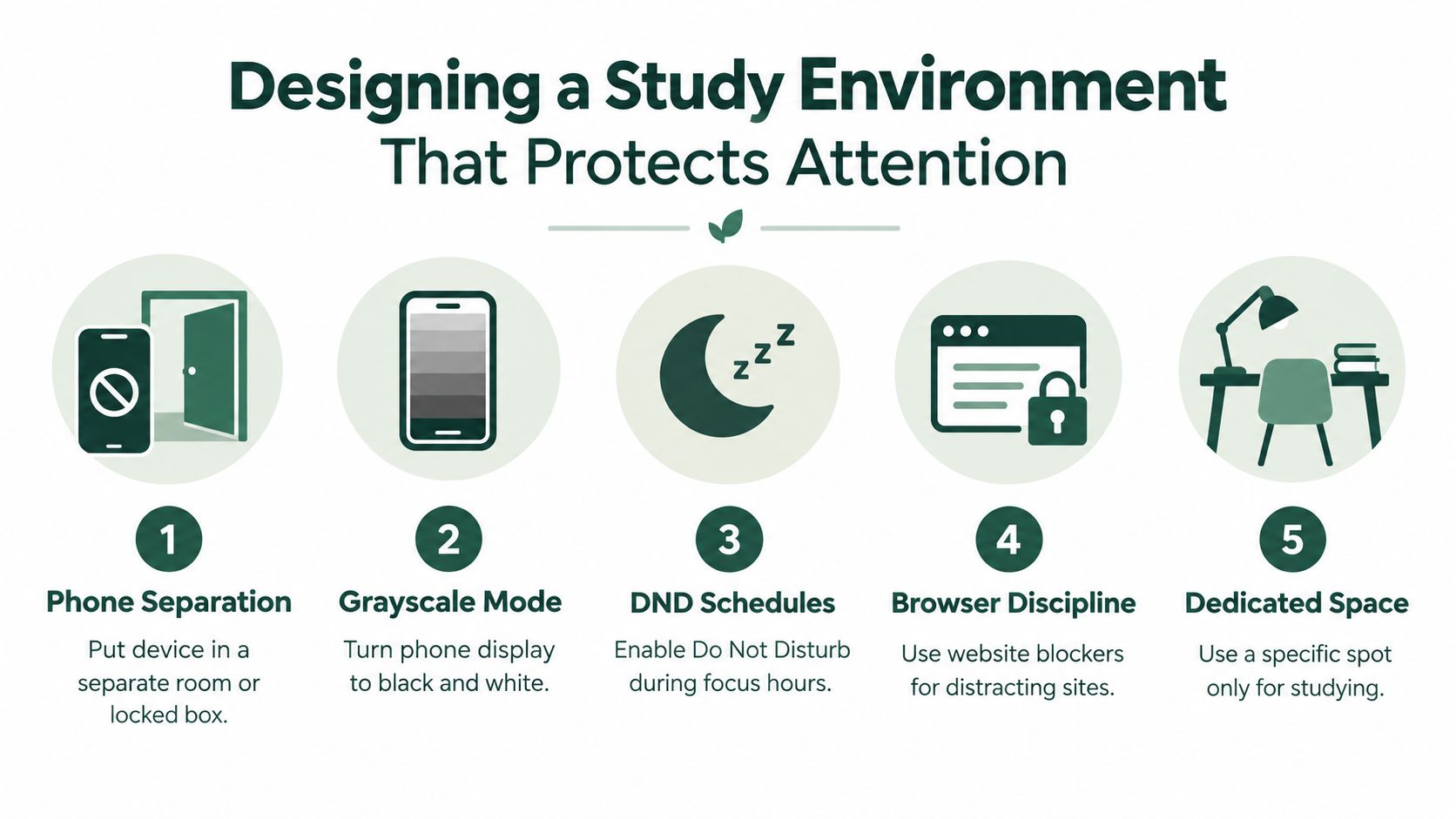
Start with the phone. Put it in another room or a locked box when the task does not require it. If authentication or accessibility makes that impractical, switch to grayscale, silence nonessential alerts, and schedule Do Not Disturb periods. Research on notifications and smartphone presence shows why intention alone offers weak protection, as described in the study of alerts, attention, and quiz performance.
Remove digital friction
During a defined session, use a website blocker, close tabs unrelated to the current output, and keep one working document visible. A single pinned document plus a written next action reduces the choices that compete with executive function. Students using assistive tools can include those tools in the same setup rather than treating accessibility as an afterthought.
Run this two-minute check before starting:
- Phone: Out of reach or set to intentional limited use.
- Browser: Required tabs open, distracting tabs closed.
- Materials: Book, calculator, notes, and accessibility tools ready.
- Output: One sentence stating what will be finished.
- Break: A non-screen activity chosen in advance.
When an interruption breaks focus, silence its source, rewrite the next action, take a brief physical reset, and resume from the last visible step. The goal is a quick return, not a perfect room or flawless week. This routine gives standard and neurodivergent students one operating system they can run across study sessions, with tools carrying part of the memory and decision load.
Habit Tracking Without the Streak Trap
Daily streaks make consistency look binary. You either complete the habit or break the chain, and one difficult day can make the entire system feel pointless. A weekly range is more forgiving and more informative because students' schedules change with exams, work, health, and family responsibilities.
Track a minimum viable study week using a few measures that match your system:
- Session floor: Did you complete at least the number of protected sessions you planned?
- Output measure: How many meaningful outputs moved forward?
- Review measure: Did you revisit older material rather than only touching new work?
- Return measure: After a missed day, how quickly did you resume?
Don't track every possible behavior. Choose one number or binary check per habit, then review it weekly. A dashboard becomes useful when it answers a decision, such as whether to reduce commitments, move difficult work earlier, or add more external cues.
| Dimension | Daily Streaks | Weekly Ranges |
|---|---|---|
| Motivation | Rewards uninterrupted chains | Rewards sustained participation |
| Missed day | Can feel like total failure | Becomes information about the week |
| Planning | Encourages rigid daily completion | Allows movement between days |
| Recovery | Often treats restarting as failure | Makes returning part of the measure |
| Best use | A small, stable routine | Variable academic workloads |
Choose the right tracking pattern
A threshold week counts only whether you reached a meaningful floor. A replacement week allows one type of planned effort to substitute for another when circumstances change. A recovery week measures how quickly you returned, rather than judging the total output of an unusually difficult period.
Measurement rule: Track enough to change your next decision, but not so much that tracking becomes another avoidance task.
Putting It All Together in Kohru
A focus app can turn the system from a written intention into a repeatable workflow. In Kohru, create a Monday study task with a specific output, place it in a Focus Session, enable distraction blocking across the devices you use, and add the result to your habit tracker. The point isn't to make the app responsible for learning. It's to remove avoidable decisions between deciding to work and beginning.
A practical Monday setup looks like this:
- Add the most important academic task to the Smart To-Do List.
- Separate it from personal errands so the work queue stays readable.
- Estimate the task and choose a focus duration that matches its difficulty.
- Start the Focus Session with phone and laptop distractions blocked.
- Use the scheduled break to move, drink water, or reset without opening high-risk feeds.
- Mark the task complete only when the defined output exists.
- Review the dashboard later and adjust Tuesday's plan according to completed work, not optimism.
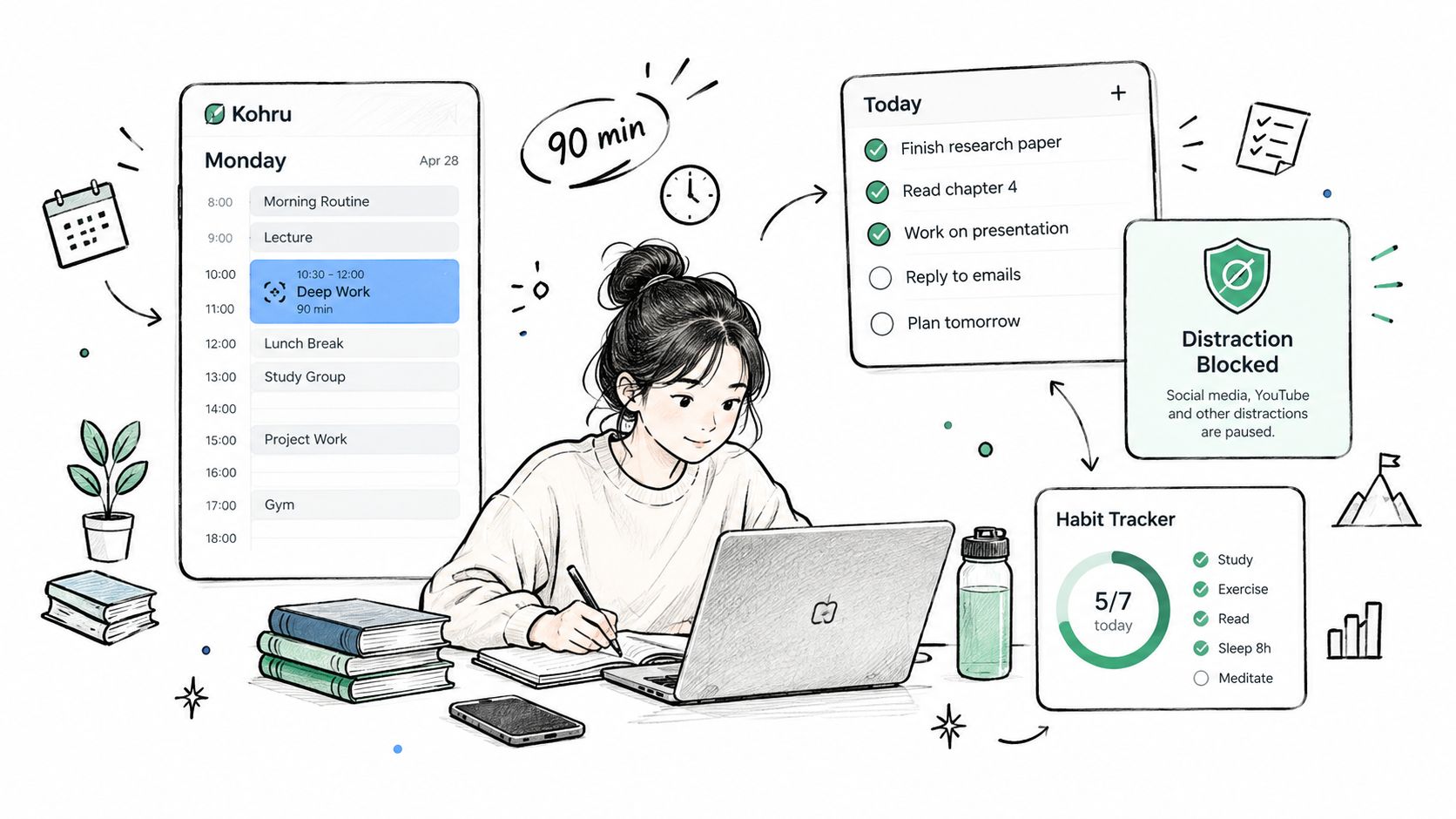
Kohru combines Focus Sessions, app and website blocking, Smart To-Do Lists, structured breaks, and flexible habit tracking in one student-oriented workflow. You can use the dashboard to see completed sessions and tasks, then change the next study block when the original estimate was unrealistic. That feedback loop matters more than a perfect Monday, because planning improves when it responds to actual behavior.
The same operating system works without an app. A calendar, paper task list, browser blocker, and weekly review can provide the same functions. The tool is useful when it makes protection, output definition, and review easier to repeat.
Your 7-Day Kickoff Plan and Self-Audit
Use the first week to install the system gradually rather than changing every habit at once.
- Day 1: Observe where your time goes. Record classes, work, commuting, caregiving, study, rest, and digital interruptions without judging the results.
- Day 2: Build the weekly template around fixed commitments and recovery. Assign subjects to realistic study windows.
- Day 3: Configure the environment. Move the phone, set notification boundaries, prepare a blocker, and create a dedicated study location.
- Day 4: Apply the Start-Now Protocol to one avoided task. Make the first action visible and schedule the return before stopping.
- Day 5: Choose your weekly tracking measures. Keep them small enough to update consistently.
- Day 6: Review completed sessions and outputs. Look for mismatches between estimates, energy, and actual work.
- Day 7: Adjust the template. Move difficult work, reduce overloaded commitments, and lock the version you'll test next week.
Ask yourself six questions at the end of the week:
- Did my focused sessions produce clear outputs?
- Which interruptions damaged my attention most often?
- Did my environment make starting easier or harder?
- Did I protect recovery, sleep, and breaks?
- Did I return after missed sessions?
- What emotion appears just before I avoid academic work?
Good time management for students isn't a performance of constant control. It's a system that helps you begin, remember, recover, and return, even when the week changes.
Kohru gives you Focus Sessions, distraction blocking, Smart To-Do Lists, structured breaks, and flexible weekly habit tracking in one workspace. Set up your first study block and test the system this week by visiting Kohru.
