smart todo list·productivity app·focus sessions·task management·Kohru
Smart Todo List: A Practical Guide to Getting More Done
Learn what a smart todo list is, why it beats traditional lists, and how to set one up. Includes features, examples, and templates for real follow-through.
15 min read
The most popular advice about productivity is also the easiest to misunderstand: write everything down. Capturing a task can clear it from your memory, but it doesn't decide what deserves attention, estimate the effort, reserve time to begin, or protect you from interruptions. A list can become a tidy record of intentions while your important work remains unfinished.
A smart todo list takes a different position. It treats a task as the beginning of an execution path, not the end of a note-taking exercise. The system helps you decide what matters, define the next action, match the task to your available energy, and create a focused opportunity to complete it.
That distinction matters because written task lists have a long empirical history. Research on task-management behavior traces studies of written to-do lists back to the 1920s, while a task-management study tracking 287 tasks found that 81% were completed by the final interview and 68% within a week when people actively reviewed and updated their lists. The task-management research summary also points to Stanford guidance that separates weekly planning from daily planning, with regular transfer and review. A list supports follow-through when it participates in a process.
An ordinary list answers one narrow question: what might I do? It rarely answers the questions that determine whether work starts, such as what comes first, how difficult the task is, how long it deserves, and when you'll begin. That's why adding more items can feel productive while making action less likely.
The first failure is the capture trap. You add an idea during a meeting, a chore while commuting, and a project while trying to sleep. The list grows because adding is easy, but completion doesn't keep pace. A grocery list without aisles creates the same problem. It contains useful information, yet it gives you no route through the store.
Then comes the priority vacuum. If every task is labelled important, the label stops helping. The urgent client revision sits beside a low-value administrative task, and the person looking at the list must make the same decision again every morning. Decision fatigue turns a supposedly helpful system into another source of work.
Four leaks that drain attention
Capture without conversion: The list stores intentions but doesn't turn “work on proposal” into a visible next action.
Flat priority: Important, urgent, interesting, and easy tasks occupy the same visual level.
Context collapse: Personal errands, coursework, household maintenance, and professional commitments appear in one undifferentiated stream.
No starting cue: Nothing tells you when to open the document, silence notifications, or work until a defined stopping point.
Context collapse creates a subtler burden. A person may open a work list and immediately see laundry, tax paperwork, three messages, and a research deadline. Each item is legitimate, but the mixture forces the brain to switch roles before work has even begun. A budget without categories would create similar confusion. The totals might be accurate, but they wouldn't show where the money goes or which decision matters next.
Practical rule: A task isn't ready for execution until it has a clear next action, a rough effort signal, and a place in your day.
A smart todo list closes the gap between intention and completed work. It doesn't need to make every decision automatically. It needs to make the important decisions visible at the moment they matter, then create a reliable loop for starting, focusing, reviewing, and adjusting.
What a Smart Todo List Actually Does
A smart todo list isn't defined by artificial intelligence, colourful icons, or a long settings menu. Define it by what the system helps you do repeatedly. At minimum, it should turn an unstructured intention into a prioritised, time-aware task that can enter a protected work session without competing with unrelated commitments.
Prioritization acts like air traffic control
Air traffic control doesn't send every aircraft onto the runway at once. A useful task system works similarly. It assigns weight to work through signals such as urgency, consequence, or dependency, then presents a manageable next choice.
That doesn't mean you need a complicated scoring formula. “Submit application materials” may outrank “organize reference folder” because one triggers a deadline while the other can wait. A smart list makes that relationship visible instead of asking you to rediscover it while tired.
Time-boxing turns hope into a reservation
“Study biology” is an intention. “Review cellular respiration for a defined work interval” is a commitment with boundaries. Adding a duration estimate forces you to confront the size of the task and gives you a practical way to fit it into the day.
Time-boxing resembles a calendar reservation. You aren't promising that the work will be perfect. You're reserving a realistic container in which the next meaningful step can happen. If the estimate proves wrong, the review process updates it rather than treating the mistake as a personal failure.
Focus sessions provide an execution cockpit
A timer alone doesn't create concentration. A focus session connects a task to a start action, a defined interval, fewer competing choices, and a clear finish condition. It functions like a cockpit instrument panel, showing the pilot only the information needed for the current phase of flight.
Starting a session from the task matters because it removes a small but costly sequence of decisions. You don't need to search for the task, choose what to do, and then decide how to work. You select the item and enter its protected execution mode.
Separation keeps contexts in distinct lanes
Work and personal tasks can both matter without belonging on the same active screen. Separation works like a multi-track audio mixer. Each track remains available, but you can lower or mute the ones that don't belong in the current moment.
A student might open a study lane during an exam period and close household errands until a planned break. A freelancer might isolate client delivery from invoicing and personal appointments. The goal isn't to pretend other obligations don't exist. It's to prevent every obligation from demanding attention simultaneously.
The growing category reflects this broader expectation. One 2025 estimate values the global to-do list app market at $3.2 billion, with a projection of $7.8 billion by 2034 and a 10.4% CAGR. The market analysis estimates Android held the largest platform segment at 38.5% in 2025, North America represented 36.2% of regional revenue, and Asia Pacific had the fastest projected growth at 12.1% CAGR. Those figures describe a market, not a guarantee that any individual tool will improve your habits, but they show that users increasingly expect task software to support execution across devices.
Smart Todo Lists vs Traditional Lists
Traditional lists are good at remembering. Smart lists are designed to help you act. The difference isn't that one uses paper and the other uses software. A paper system can be intelligent if it includes priorities, scheduled blocks, context, and review. A digital list can remain passive if it only collects items and sends alerts.
The cleanest comparison uses five questions. A conventional list usually answers only the first. A smart todo list tries to answer all five without making the user rebuild the plan each time.
Dimension
Traditional List
Smart Todo List
Priority handling
Items often appear in a flat sequence, or everything is marked important
Tasks carry meaningful priority signals that guide the next choice
Time awareness
The list may show a deadline but not the effort required
Tasks include duration estimates or scheduled work blocks
Execution support
The user must decide how and when to start
A task can launch into a defined focus session
Context switching
Work, personal, and side-project items share one stream
Separate lanes let the user view the relevant context
Review rhythm
Review happens when the list becomes uncomfortable
Weekly targets, difficulty tags, and regular check-ins support adjustment
The flat list creates a familiar failure: it grows until the first screen contains too much history. A smart list treats visibility as a decision, not a storage requirement. Deferred work can remain recorded without competing with the task that deserves attention today.
The hidden difference is accountability
Traditional systems rely on self-generated discipline. You capture a task, remember to revisit it, estimate its size in your head, and protect yourself from interruption. That can work for small workloads, but the system becomes fragile when deadlines, shifting priorities, and multiple contexts collide.
A smart list adds accountability to action. It asks you to attach a task to an effort level, a duration, and a work setting. The list can't write the report or solve the problem, but it can make “start now” more concrete than a vague item buried beneath unrelated reminders.
A useful list should reduce the number of decisions between seeing a task and beginning it.
The distinction also explains why more features don't automatically produce better results. A tool can offer labels, nested projects, automation, and reminders while still leaving the user alone at the most important moment. Intelligence is valuable only when it reduces friction around starting and finishing.
How to Set Up a Smart Todo List That Sticks
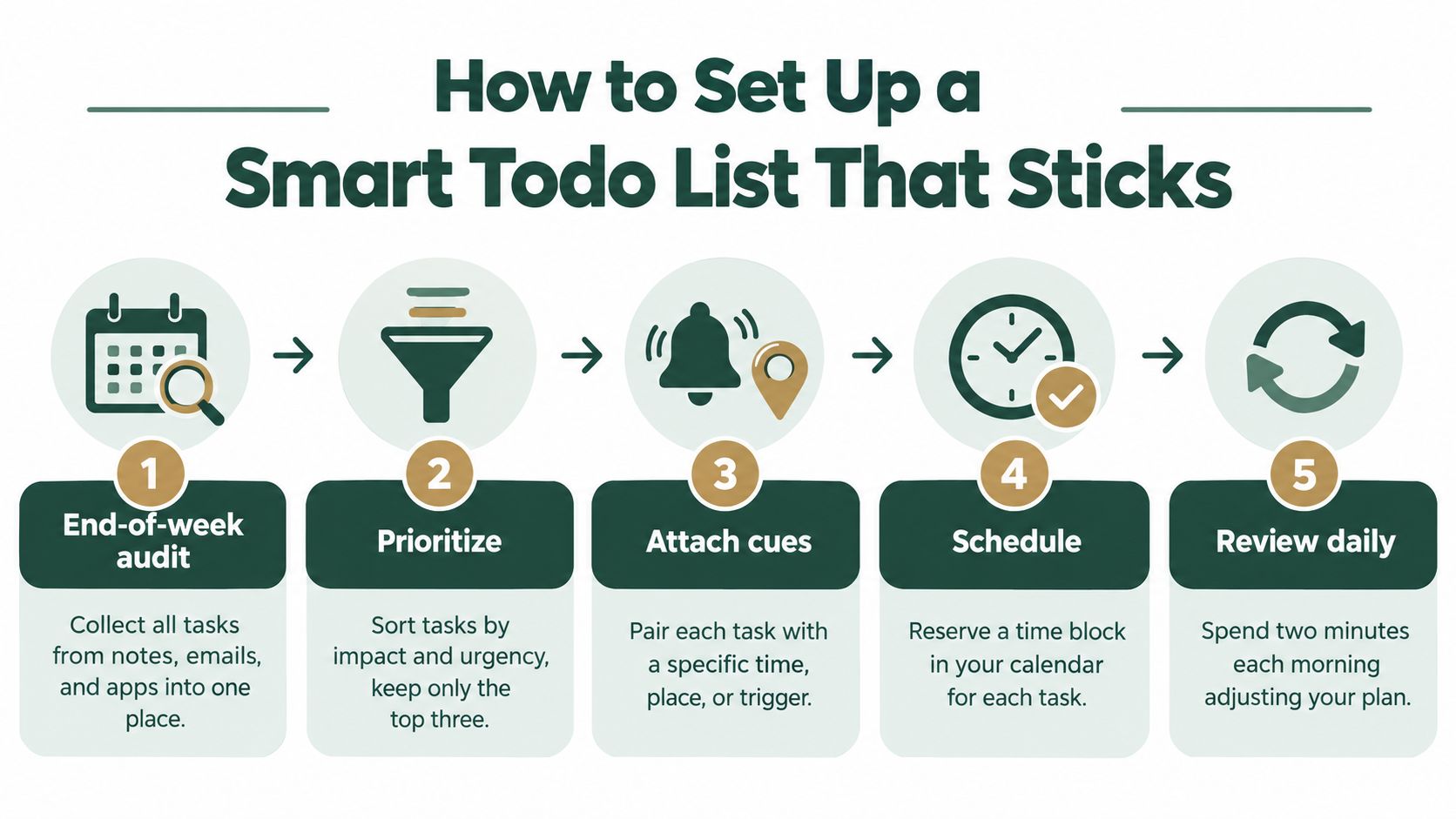
A smart setup starts with a reset, not another app. Choose one end-of-week review and collect tasks from notes, flagged emails, browser tabs, paper scraps, and memory. Do not organize while collecting. Build one reliable view of the commitments you are carrying, then shape that view into a system for follow-through.
Turn each vague item into an observable action. “Prepare presentation” could become “draft the opening slide,” “choose the supporting data,” and “rehearse the explanation.” The wording should tell you what to do when work begins. A project name records an intention. An action gives that intention a handle.
Attach three planning cues
Every active task needs three fields:
Difficulty tag: Mark it light, medium, or deep. Reading a familiar chapter may be light, solving unfamiliar problems medium, and producing a full draft deep.
Duration estimate: Choose a realistic working interval. If the task is unfamiliar, make a rough estimate and revise it after completion.
Context tag: Separate work, personal, study, errands, or another category that reflects where your attention belongs.
These cues turn a flat list into a decision aid. Difficulty tags prevent a high-energy task from being placed in a low-energy window. Duration estimates reveal an overloaded plan. Context tags keep a study session from becoming an unplanned household-management session.
Set capacity before filling the day
Set a daily capacity rule based on your actual energy. One possible pattern is two deep tasks and four light ones, but it is not a universal quota. Classes, care responsibilities, and unpredictable meetings may leave you with less capacity.
Reserve two focus sessions on the calendar before filling the remaining gaps with short tasks. Treat those sessions like appointments. A light task can fit between meetings. Deep work needs a protected starting point, or it will keep waiting for an empty space that never appears.
Weekly targets add direction without forcing every hour into a rigid schedule. Choose a concrete output, such as completed practice sets or finished drafts, then use daily sessions to make progress toward it. The target shows what the week is for. The session answers what starts today.
Close the loop each evening
Spend a brief evening review marking completed work, rescheduling unfinished items, and choosing the next day's first task. Do not carry every unfinished item forward automatically. Ask whether it still matters, whether the next action is clear, and whether the difficulty or duration estimate was unrealistic.
Students can replace work categories with courses, modules, assignments, and study goals. A broader approach to effective study scheduling can help connect study tasks with available time instead of treating revision as unlimited.
The system sticks when reviews stay short and decisions stay explicit. Its purpose is to make tomorrow easier to begin, not to create another job maintaining the list.
Real-World Examples for Students and Professionals
A graduate student two weeks before exams does not need a longer list. They need a list that distinguishes reading, practice, questioning, and testing, because each type of work asks for a different kind of attention. Assigned readings, practice problems, lecture notes, office-hour questions, and mock exams should not sit together as interchangeable lines.
Reading a familiar section can receive a light difficulty tag. A new set of practice problems may be medium. A timed mock exam is deep because it requires sustained attention and produces feedback about readiness. The student can reserve focus sessions for the deepest work and set a weekly target for completed practice sets. The target gives the week a destination. The session identifies the work that begins today.
The evening review keeps the system honest. If a practice set takes longer than expected, the student updates the estimate and moves a lower-value reading task instead of pretending both will fit. A broader approach to effective study scheduling can help connect study tasks with available time, rather than treating revision as unlimited.
A remote consultant faces different tasks but the same follow-through problem. Client deliverables can carry effort tags and client labels, while strategic writing stays separate from administrative work. The consultant reserves focus sessions for drafting and groups calls into one afternoon block, so conversations do not break the writing period into unusable fragments.
Mechanic
Graduate Student (Exam Prep)
Remote Professional (Client Work)
Capture
Course readings, problem sets, questions, and mock exams
Deliverables, drafts, calls, approvals, and admin
Difficulty
Reading as light, practice as medium, mock exams as deep
Routine updates as light, analysis as medium, strategy writing as deep
Context
Course modules and study goals
Client, internal, and personal lanes
Weekly target
Completed practice sets
Completed deliverable milestones
Focus sessions
Protected blocks for problem solving and mock exams
Protected blocks for writing and strategic analysis
Evening review
Adjusts study estimates and selects the next course priority
Reschedules unfinished work and prepares the next client action
The pattern works across roles because it is built around behavior rather than job titles. Both people define the next action, label the effort, reserve time for focused work, and review what happened. The list becomes a record of working patterns, not just a catalogue of obligations.
A repeatedly postponed task also provides useful information. It may need a smaller next action, a lower difficulty assumption, a different time of day, or removal from the active list. The right response is to adjust the system, not keep copying the same task into tomorrow.
The Science Behind Follow-Through and How Kohru Puts It to Work
People often confuse a strong intention with a usable plan. “I'll work on the thesis tomorrow” expresses motivation, but it leaves the start cue, duration, and environment undefined. Implementation-intention thinking closes that gap by pairing an action with a condition, such as a time, place, or trigger. Difficulty tags and time estimates make that pairing more concrete.
Planning also fails when people underestimate how much effort a task requires. A duration field doesn't eliminate that error, but it creates a feedback loop. After several reviews, you can compare estimates with reality and plan from experience rather than optimism.
A focus session protects attention by reducing the number of competing decisions after work begins. It can define one objective, provide a stopping point, and support a distraction-free environment. That makes it different from starting a timer while leaving email, messages, and unrelated tasks fully available.
Separating work and personal categories also reduces unnecessary mental switching. You still have access to both areas, but the active view reflects the role you're performing now. Weekly targets add another layer by shifting attention from fragile daily perfection to visible progress over a broader period.
Kohru puts these principles into one task workflow. Its Smart To-Do Lists separate Work and Personal tasks, while task entries support time estimates and difficulty levels before the user turns an item into a focus session. Its habit-tracking approach uses flexible weekly targets, and its dashboard presents progress through measures such as focus time saved and tasks completed. These elements map directly to the behavior design problem: clarify the action, size the effort, protect the start, and review progress.
A short demonstration can make the relationship between a task and a focus session easier to understand:
The tool doesn't replace judgment. You still choose the priority, decide what “done” means, and adjust the plan when conditions change. The system works when the interface supports those decisions at the right time.
Choosing Your First Smart Todo List System
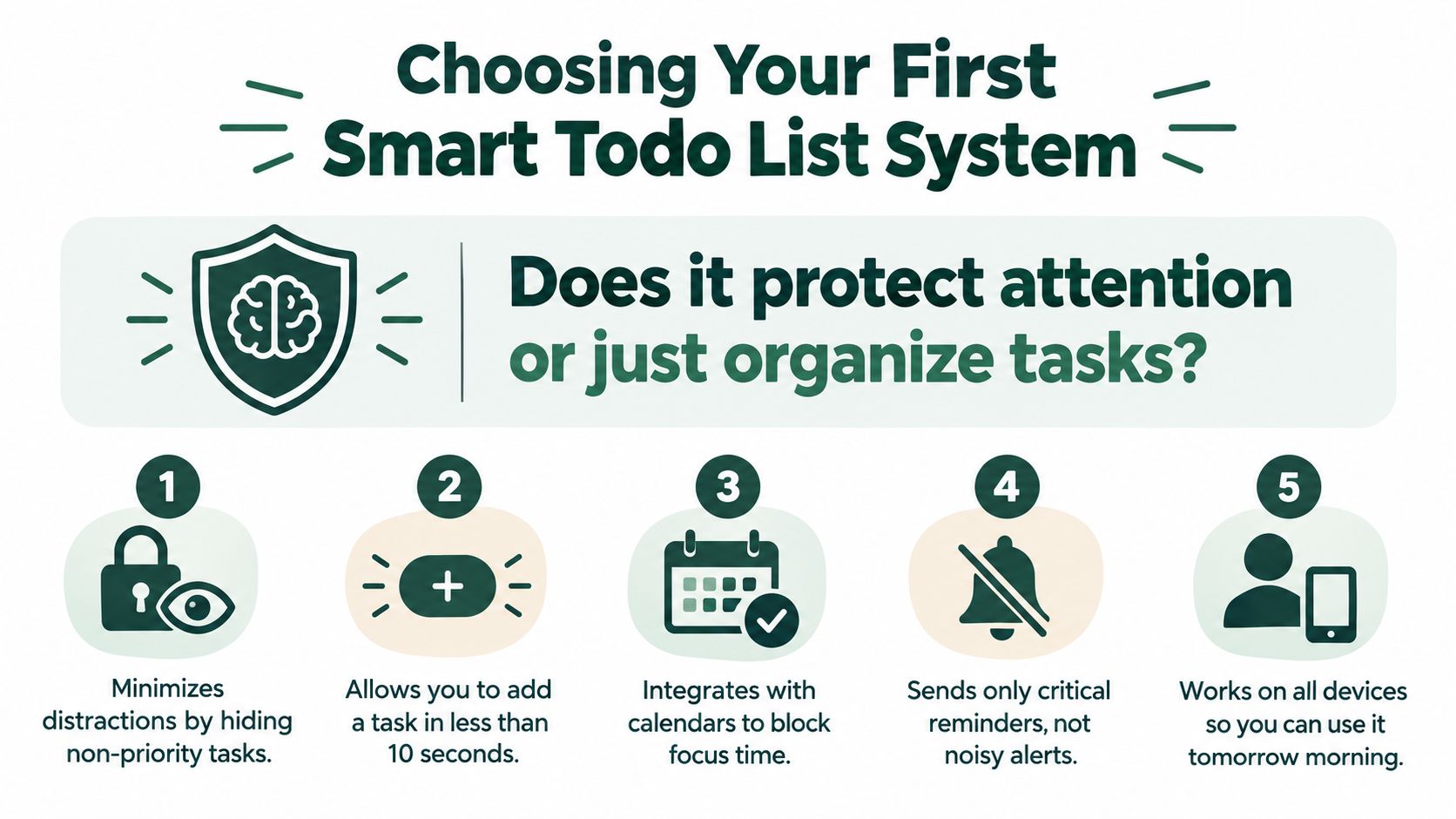
A smart list earns its place by helping you begin and finish work. Feature counts are a poor test. Start by examining whether the system turns an intention into a protected work period, rather than leaving execution to a separate collection of tools.
Look for focus-session support first. Can you choose a real task and begin a defined work interval without rebuilding the plan elsewhere? An app that only stores a deadline may leave you coordinating a calendar, timer, blocker, and context system before the work even starts.
Check separation next. Work and personal tasks should be easy to distinguish if you study, freelance, work remotely, or manage household responsibilities alongside professional goals. A universal list can serve as an inbox, but focused work needs a narrower view that keeps unrelated obligations out of sight.
Three filters for a practical test
Focus protection: Find a direct path from task selection to a distraction-reduced session.
Context control: Confirm that you can open the relevant work or study lane without displaying every obligation.
Effort visibility: Test whether difficulty and duration can be added quickly enough for honest planning.
Use a real task during the trial. Enter something you need to complete, assign its difficulty, estimate its duration, and start a session. A demo task hides the moments that matter, especially when you are tired, rushed, or uncertain how long the work will take.
Your reaction is useful evidence. Dread around opening a list points to a behavior problem, so another capture feature will not solve it. If recorded tasks regularly remain unfinished, prioritize follow-through mechanics such as focus sessions, difficulty tags, and weekly targets. A 2025 comparison reports that 73% of users abandon new productivity tools within 30 daysthe productivity app comparison. Simplicity and repeat use therefore belong in the evaluation, alongside features.
Kohru brings separate Work and Personal tasks, difficulty and duration cues, focus sessions, and weekly progress targets into one workspace. A paper-first routine, calendar-centred system, or collaborative project manager may fit another person better. Select the system that gives your next real task a clear path from planning to completion.
Kohru combines Smart To-Do Lists, difficulty and duration planning, distraction-reduced Focus Sessions, and flexible weekly targets for students and professionals who want to turn intentions into completed work. Visit Kohru to explore the system and choose one real task to plan, schedule, and finish with less friction.