work task list·task prioritization·focus sessions·work vs personal·to-do template
Work Task List: Build, Prioritize, and Finish
Build a work task list that survives interruptions: prioritize, separate work from personal, and turn each item into a focus session.
13 min read
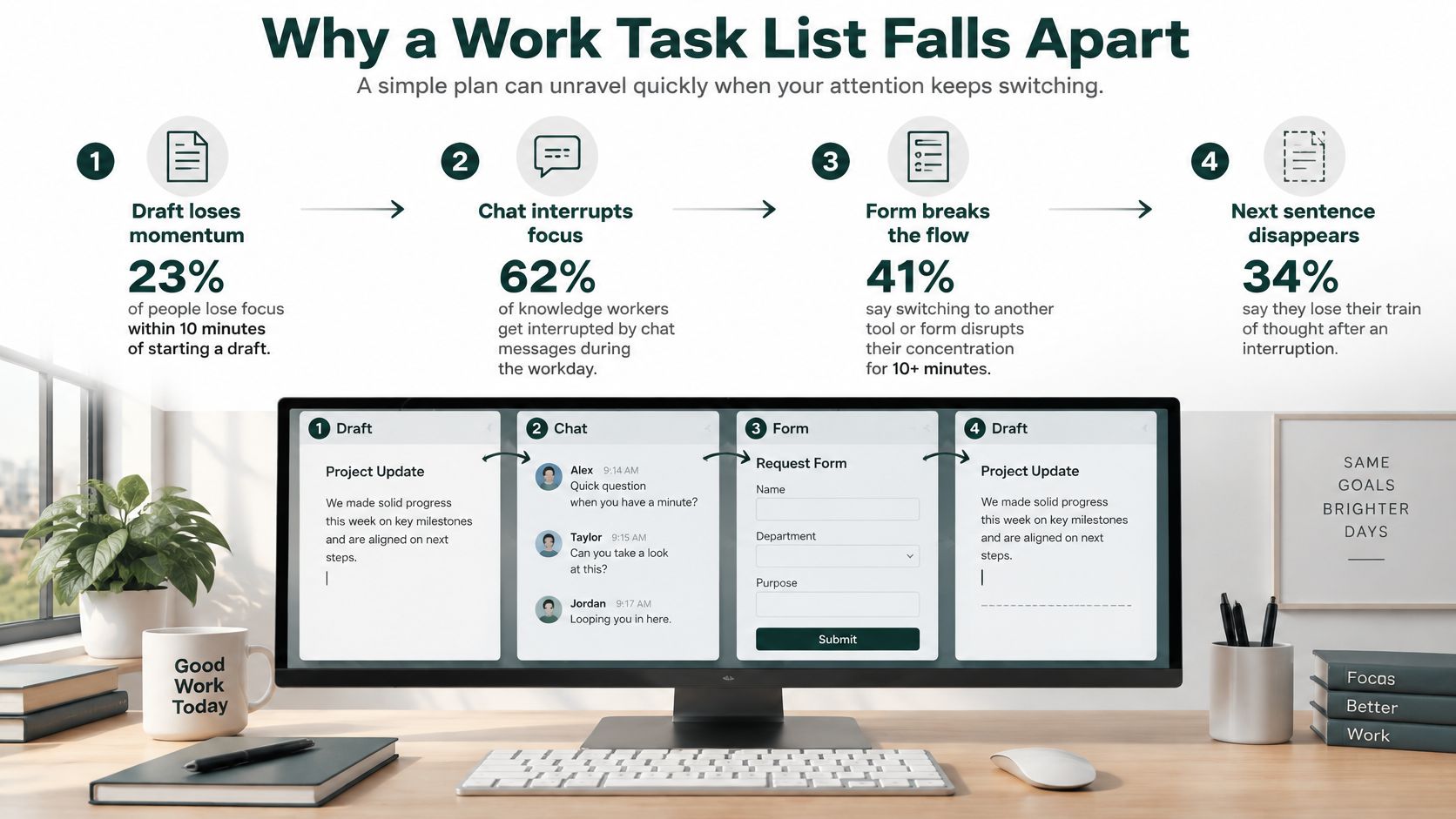
57% of working spheres were interrupted in a University of California, Irvine workplace field study, where employees stayed within a broader activity for an average of just 11 minutes and 4 seconds. Your morning can look much the same: open a draft, answer a chat, complete a form, then return to the draft without remembering the next sentence.
A useful work task list doesn't assume that morning will suddenly become uninterrupted. It gives you enough context to restart, a visible condition for finishing, and a protected session in which to produce something.
Capturing an obligation isn't the same as preparing it for execution. An entry such as methods revision tells you what you're responsible for, but not where to begin when you return from a lecture or meeting.
Kohru is an answer when your work task list needs to become protected work, not just stored intentions. It's an app built for students that helps you block distractions on your phone and laptop at the same time.
Use the interruption pattern below to identify the missing part of a conventional checklist: a reliable way back into the task.
The answer isn't a longer description of the project. It's a compact set of execution details that lets a tired person open the right file and take the next action without another planning session.
Fields every work task list line needs
Field
What to write
Example
Outcome
The result this session should produce
Methods section revised
Next action
One physical verb plus an object
Rewrite the sample paragraph
Working sphere
The theme this block belongs to
Writing
Effort
Minutes you will protect
45 minutes
Done when
An observable stopping condition
Paragraph saved in the draft
Restart cue
The exact place to reopen after a break
Comment labeled sample size
List
Work or Personal, never both
Work
Say a graduate student has methods revision on their list. For a hypothetical 45-minute session, they narrow that outcome to rewriting the sample paragraph, classify it as Writing, and stop when the revised paragraph is saved.
The restart cue is the comment labeled sample size. After an interruption, the student doesn't reread the whole document to reconstruct their intention; they find that comment and continue.
Make completion smaller than the project
The outcome can describe the broader purpose, but the done condition must fit the session. Revising the entire methods section may require further work; saving the corrected sample paragraph is an observable deliverable.
Practical rule: A restart cue should tell you where to look and what to do, not merely remind you that work remains.
You don't need elaborate metadata for everything you capture. Keep rough ideas in an inbox, but drop any line from the executable list if you can't fill these fields. An obligation without an action, stopping condition, or restart location isn't ready for protected time.
How to Build Your Work Task List
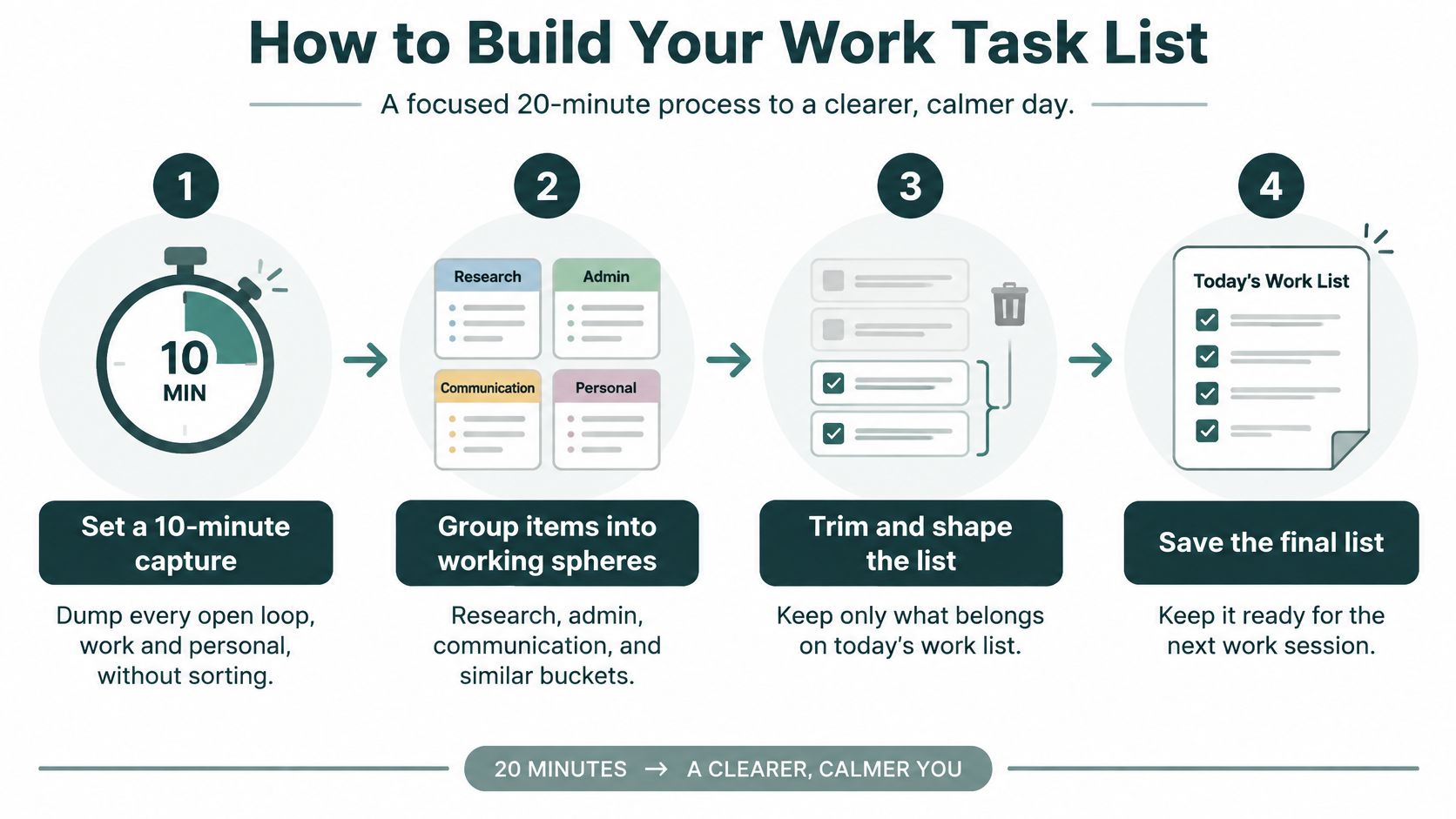
Build the list in a short sitting rather than maintaining it continuously. For example, allow about 20 minutes to capture, group, and shape today's work, then stop arranging and start executing.
This visual summarizes the preparation sequence.
Make the preparation pass
Capture without sorting. Try a 10-minute timer and write every open loop, including personal obligations. Sorting while capturing encourages you to polish familiar tasks while forgetting less comfortable ones.
Group related work into working spheres. Use categories such as research, writing, administration, class delivery, client delivery, and life admin. Observational findings discussed in an interruption review available through APA PsycNet include approximately 12.2 working spheres per day, average switches every 10 minutes and 29 seconds, and self-interruption roughly 44% of the time. Use the grouping to expose competing contexts, then show only the highest-priority sphere while working.
Rewrite each survivor as a physical action. Replace a project label with a verb and an object: compare the abstracts, annotate the results table, or rewrite the opening paragraph. You should be able to begin without deciding what the entry means.
Estimate effort and specify the stopping condition. For example, a session might end after drafting the introduction, classifying 20 papers, or sending three follow-ups. These are proposed deliverables, not productivity benchmarks; choose a scope that fits the actual material.
Tag each line Work or Personal. Move personal items to a separate list that stays closed during work blocks. Capturing a prescription refill should let you stop thinking about it, not keep it beside your dissertation draft.
Select at most three priority tasks. Start with work that unblocks someone else, then consider deadlines. This is a working cap, not a promise that every day has identical capacity.
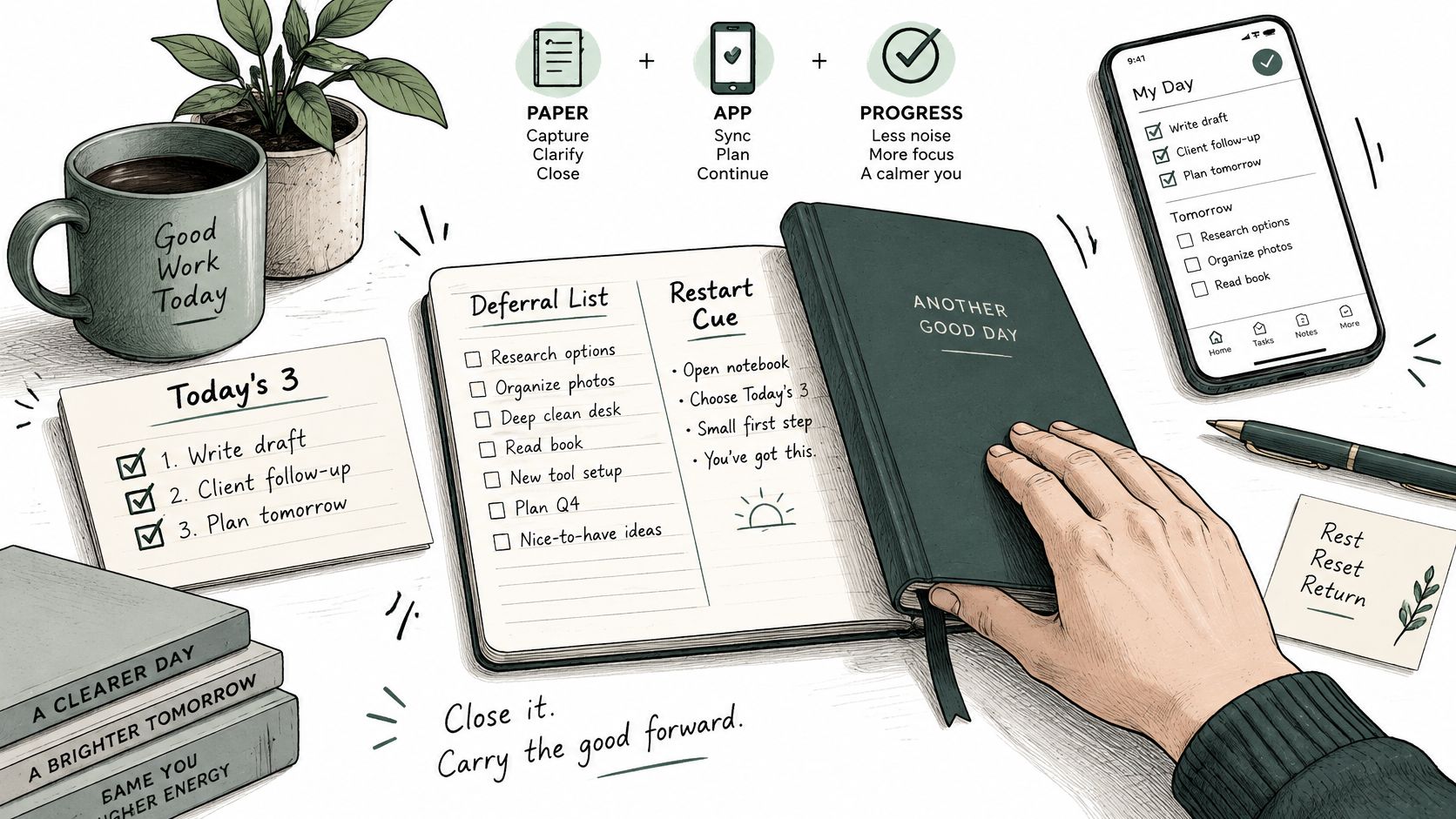
Park everything else on a deferral list. Open it at the day's review rather than during the block. Otherwise, every uncomfortable moment becomes an invitation to choose easier work.
For ADHD-friendly planning, Jan Kutschera's guide to structure your day around your ADHD brain offers a useful companion perspective. Use planning supports to make starting easier, rather than adding more fields to maintain.
Keep the finished view small
Avoid three preparation mistakes: combining a strategic project and a tiny chore on the same line, leaving the entire backlog visible beside today's priorities, and treating a notification as a new priority. Each undermines the distinction between work you've chosen and work you've merely noticed.
For a remote analyst, a finished selection could look like this:
Work, writing: Draft the recommendation paragraph; stop when it's saved for review.
Work, data check: Reconcile the missing-value flags; stop when discrepancies are annotated.
Work, follow-up: Send the clarification request; stop when the message is sent.
Personal, hidden until evening: Book the dentist appointment.
Personal, hidden until evening: Order the replacement charger.
Keep the writing line visible during writing, then reveal the data-check line at its scheduled checkpoint. The day list can span themes without placing all of them in front of you simultaneously.
For a visual companion to the planning routine, use this walkthrough.
Choose What Stays on Today's List
Ways to decide what stays on today's list
Method
Best when
Rule
Watch-out
Single working sphere
The day is already fragmented
Stay in one theme until the block ends
A real emergency still needs a deferral note
Eisenhower sort
The weekly backlog is mixed urgent and important
Keep important-urgent, date important-not-urgent, batch or delegate urgent-not-important, delete neither
Sorting every hour becomes another interruption
Top three
Too many tasks look equally due
Only three items may be today's priorities
A fourth idea must wait for the evening review
Effort bands
Tasks range from brief chores to half-day work
For example, batch under 15 minutes, protect 25 to 50 minutes, split over 90 minutes
A vague estimate hides an oversized task
Twice deferred
The same line keeps rolling forward
Resize, name the blocker, or delete
Carrying it unchanged trains you to ignore the list
A long list creates more opportunities to leave something unfinished, not just more choices. In a study of software developers available on arXiv, 29% of interrupted or switched tasks were never resumed, and developers working across two or more projects spent approximately 17% of development effort on cross-project interruptions.
Match the method to the decision
Use a single working sphere when meetings already divide the day. Stay inside research or administration until the checkpoint, and capture incoming requests without automatically acting on them. A genuine emergency can override the block, but record the displaced task before responding.
Use an Eisenhower sort for a weekly backlog review, not as an hourly ritual. Important, urgent work stays active; important, nonurgent work gets a dated session. Batch or delegate urgent work that doesn't require your judgement, and delete items that are neither important nor urgent.
The top-three cap controls admission to today. Effort bands control fit: a brief follow-up belongs at the end of a related block, while a large analysis needs smaller deliverables before it reaches the calendar. Neither approach tells you to ignore changing deadlines.
A newly noticed task isn't automatically more important than the task you've already started.
The twice-deferred rule diagnoses a different problem. An unchanged carryover may conceal missing information, an oversized deliverable, or work you no longer intend to do. Name which problem applies before moving it again.
Apply the cut to a student day
Say a graduate student has a paper revision, a problem set, and three life errands. The paper needs a supervisor's feedback, the problem set has an approaching deadline, and the errands can wait until evening.
The surviving work lines are:
Unblock the paper: Send the supervisor the specific methods question.
Advance the revision: Rewrite the sample paragraph using information already available.
Meet the deadline: Complete and check the assigned problem-set section.
Those lines don't all belong in the same block. Send the question at a communication checkpoint, protect writing time for the paragraph, and schedule the problem set separately.
The dentist call, grocery order, and parcel return stay on Personal, reviewed after 6 p.m. in this example. If an errand has a genuine daytime constraint, schedule it explicitly rather than letting it compete for attention throughout a writing session.
Run Each Task as a Focus Session
With the work selected, execution should require fewer decisions than planning. Choose a line, prepare its environment, and leave behind either a completed deliverable or an accurate record of what remains.
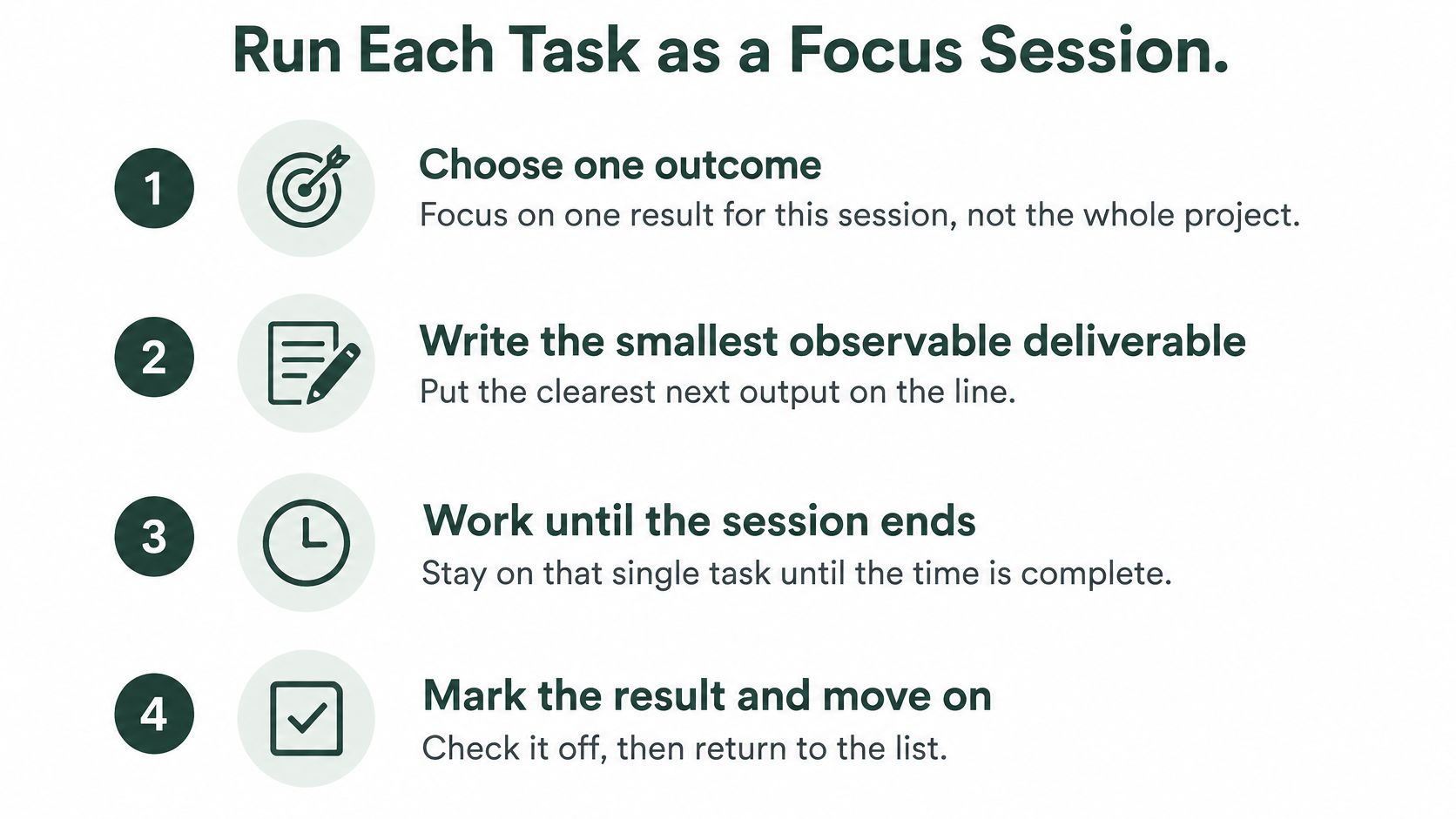
Use this checklist as a reminder of the session's basic shape.
Follow the execution protocol
Choose one outcome. Select the result for this session, not the whole project. If you can't name the result without saying several unrelated things, narrow it.
Write the smallest observable deliverable on the line. For an analysis task, that might be a discrepancy note attached to the spreadsheet rather than a general promise to investigate.
Block predictable digital triggers before starting. Close unrelated browser tabs, silence nonessential notifications, and block distracting apps on both the phone and laptop. Keep necessary reference material available.
Work until the planned checkpoint, then take a short break. For example, choose a 25-, 45-, or 50-minute block according to the task and available time, rather than restarting the timer whenever the work becomes difficult.
Record the result before leaving the chair. Mark whether the deliverable is done, estimate the remaining effort if it isn't, and write the next action while the context is still fresh.
At day's end, classify open lines as finished, deferred, blocked, or obsolete. Re-estimate unfinished work rather than treating the original estimate as a commitment you must defend.
Protect the interval, then handle disruption
Blocking isn't decorative. A study in the Australasian Journal of Educational Technology identified pop-up phone notifications as the main external interruption, triggering 59% of off-task multitasking, while task completion was the second-most prevalent trigger at 20%.
Kohru matches this protocol by turning a Smart To-Do item into a one-click Focus Session, with simultaneous phone-and-laptop distraction blocking, custom durations, and difficulty modes. It's useful when you want task selection and blocking in the same workflow; a paper list with separately configured device controls can also implement the method.
Choose a blocking setup that still allows essential calls, required applications, and reference access. Excessively restrictive settings can force you to dismantle the session to do legitimate work.
If a meeting cuts the block, leave the restart cue inside the file, where you'll need it. Put the same task back at the top when its deliverable remains today's priority; reschedule it when the remaining effort no longer fits the available time.
A checked box counts only when the done condition is met.
For a trial week, keep a simple tally of tasks finished, tasks started, switches within sessions, and lines deferred twice. Treat the tally as a diagnostic: many starts with few finishes call for smaller deliverables, while frequent switches call for better session boundaries.
Don't turn an interrupted block into a failed day. The immediate responsibility is to preserve the state of the work and make a deliberate decision about returning.
Set Up Paper or App and Close the Day
Choose the medium you can maintain under ordinary pressure. Paper offers visibility without another application; an app offers easier rearrangement and access across locations. Neither compensates for vague wording or an unrealistic workload.
Keep the physical or digital setup simple enough that you can use it between a lecture and a meeting.
Set up paper for movement
Put today's three priorities on an index card. Keep the deferral list on a notebook page, and write restart cues in the card's margin so they remain visible without crowding the action.
Draw a line through finished tasks rather than erasing them. You'll retain a record of completed outcomes, which helps distinguish a busy day from a day spent repeatedly opening work.
Carry the card with the notebook or laptop you use. A list left on your desk can't help you restart after a lecture elsewhere.
Paper's limitation is duplication. If your task depends on a document comment, write the comment's exact label on the card instead of copying a long technical explanation. Keep sensitive details in the appropriate file, not on something you might leave in a classroom.
Configure an app without creating another inbox
Use a single capture inbox, then empty it into separate Work and Personal lists. Several partially maintained inboxes force you to search for commitments before you can even choose work.
Hide the backlog during a session, batch administration at a planned checkpoint, and enable blocking for the selected interval. Keep chat outside the task-list window so opening the next action doesn't also expose you to new requests.
The cost of an app is configuration and upkeep. Skip elaborate tags unless they change what you do next; a system that requires constant housekeeping competes with the work it's meant to support.
These rules apply to either medium:
Write for low energy: Use instructions you can understand at the end of a demanding day, not shorthand that only makes sense while you're planning.
Cap visible work in progress: Keep the current deliverable prominent and unrelated commitments out of the execution view.
Review at a fixed time: Tie the review to a dependable event, such as closing your laptop after the final class.
Measure outcomes: Track completion rate, median cycle time, context switches per session, and deferred-task age without building an elaborate reporting project.
Read the signals without rewarding busywork
In a software-developer interruption study held by ETH Zurich, 97% of respondents associated disruptive interruptions with extra time needed to regain focus, 95% with extra time needed to complete the task, and 91% with losing track of work. Your records should help locate those practical problems, not grade your motivation.
Completion rate compares finished tasks with started tasks. Median cycle time is the middle elapsed duration from starting an item to finishing it; it includes waiting, so interpret blocked tasks separately.
Switches per session reveal whether you stayed with the chosen work. Deferred-task age shows how long an obligation has remained unresolved, even when you've repeatedly rewritten it onto a fresh page.
Don't improve these measures by splitting work into meaningless checkboxes. A useful deliverable should advance the assignment, reduce uncertainty, or provide something another person can use.
For manager-assigned or course-assigned work, preserve the original requirement but translate it into your own executable wording. If a professor assigns a literature review, your current line might be compare the inclusion criteria in the selected papers, with a saved comparison table as the done state.
If focus is unreliable, try a shorter first session, such as 25 minutes, with a cue naming the page and paragraph. Reduce the startup demand before assuming you need a more complicated planner.
Close the day with decisions
Classify every line in both lists. Mark it finished, deferred, blocked, or obsolete. A blocked item needs a named dependency, not just a later date.
Rewrite survivors so the first word is a verb and the restart cue still points to the right location. Documents change during work, so an old cue can become misleading.
Choose tomorrow's work. Select three work lines and a personal line for after the work blocks. Check them against actual calendar space.
Fix or remove anything that has slipped twice. Resize the deliverable, request the missing input, renegotiate the commitment, or delete it.
Schedule tomorrow's first session. If you're deliberately starting it now, record that work rather than checking it off in anticipation.
Tomorrow evening, ask whether the selected work reached its done states and whether the next day's first action is already written. If not, adjust scope, timing, or dependencies before adding more tasks.
Kohru offers Smart To-Do Lists and one-click Focus Sessions that pair your chosen task with distraction blocking on your phone and laptop. Visit Kohru to turn a restart-ready work task list into protected sessions with clear stopping points.