Summary of the Article
You can study with focus without paying for a subscription. Most of the apps below give you a real free tier you can use for a full study session today, and each section says exactly what $0 does and does not buy. Where an app's pricing details are not confirmed here, we say so and point you to the app. Pick based on your main problem: starting tasks, phone distraction, or staying accountable.
- Kohru: blocks distractions across phone, laptop and Chrome and turns your task list into focus sessions; see the app for current pricing.
- Flora: grow trees when you stay off your phone; the timer, to-do list, habits and group sessions are free.
- Forest: free focus timer with Deep Focus blocking and Time Guard for one app or site; Plus adds more blocking and stats.
- Be Focused: a free-forever Pomodoro timer on iPhone, iPad and Mac; Pro adds syncing and exports.
- Focus To-Do: a Pomodoro timer fused with a to-do list; the free core works well, premium mainly adds sync.
- Pomofocus: a free browser timer with custom lengths and reports; the free tier shows ads.
- Focusmate: three free study-with-a-stranger sessions per week for body doubling.
- Foci: a free browser task manager with an optional focus timer and no signup needed.
What "free" really means
Most roundups of free focus apps for studying just name products and move on. But "free" hides three different deals, and knowing which one you are getting saves you from downloading an app that stops working after day one.
- Fully free: everything you need costs nothing, forever. A few apps in this list come close.
- Freemium: the core loop is free, but useful extras sit behind a paid tier. Most focus apps work this way, and most students never need to pay.
- Free trial, then paywall: you get a taste, then the app asks for a card. This is the one to watch for, because "free" in the store listing can mean "free for a week."
Each app below is judged on what you actually get for $0 where that free tier is confirmed on the developer's own page. Where pricing details are not covered here, the article says so plainly instead of guessing.
Kohru: blocking plus tasks and habits in one app
Kohru is built around the study loop instead of just the timer. You organize tasks into Work and Personal lists, turn a task into a focus session, and the app blocks distracting apps and websites on your phone and laptop while you work. A Chrome extension extends those sessions into your browser, so a late-night Wikipedia detour gets blocked on all your screens.
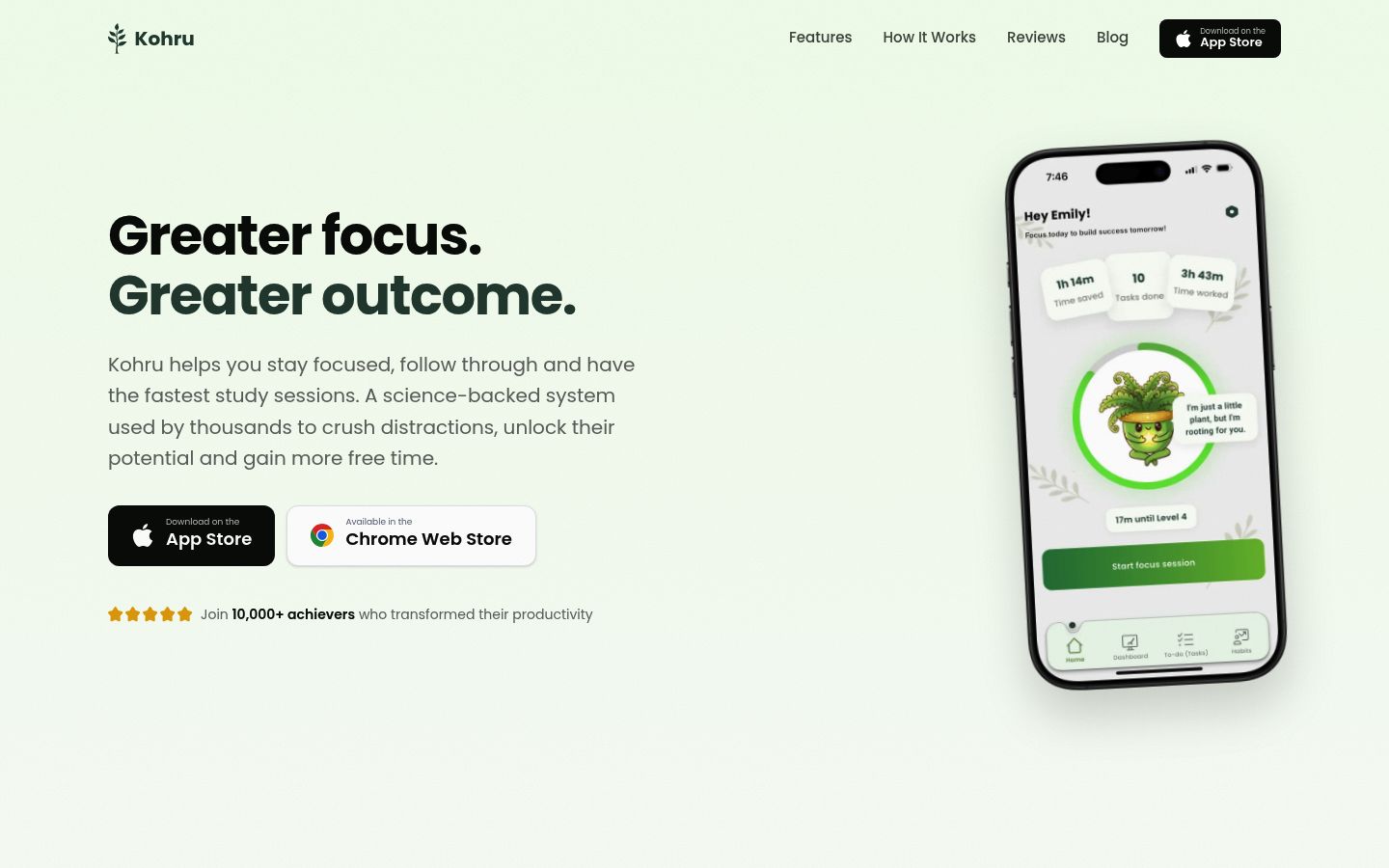
Alongside the sessions, Kohru tracks habits, focus time, completed tasks and progress, so you can see whether your studying actually happened this week. It is aimed at students, including people with ADHD or other task-starting challenges, and the design treats distraction as something to work with rather than a character flaw.
Best for: students whose phone or laptop is the reason they are not studying, and who want one app covering blocking, tasks and habits.
Tradeoff: it is more than a bare timer. If you want the simplest possible countdown and nothing else, a pure Pomodoro app below does that with less to learn.
Pricing note: this guide describes what Kohru does, not what it costs. Check the app or its App Store listing for current pricing before you commit.
Flora: grow trees with friends
Flora is the original app for planting trees with friends. You set a focus length and press start. If you leave the app to check social media, the tree dies. Studying with a group is where it is strongest: if everyone stays off their phones together, each of you wins an extra tree.
The free tier covers the focus timer, the to-do list, habit tracking through your garden, and group sessions. The Google Play version runs without ads, and optional purchases exist: extra plant tours cost $0.99 to $1.99 each according to Flora's App Store listing, plus opt-in services that fund planting real trees.
Best for: anyone motivated by visible streaks and gentle group pressure.
Tradeoff: motivation comes from the game, not the tools. If trees do nothing for you, the free timer alone is not a reason to switch.
Forest: the free tier covers the basics of blocking
Forest works like Flora: stay off your phone, grow a tree. Its own plans page is explicit about what is free with no credit card and no time limit: the focus timer, Deep Focus mode for app blocking, Time Guard for one app or website, one Mindful Space soundscape, focus tracking, and group focus rooms. Plus unlocks custom allowlists, blocking more than one app or site, focus analytics and an ad-free experience, with pricing that varies by region and platform, so check your app store for the current local price.
The free tier shows occasional ads, though Forest says they never appear during active focus sessions.
Best for: people who want blocking included in the free tier and like Forest's longer track record.
Tradeoff: the one-app-or-site limit on Time Guard is thin if your distraction list is longer than that.
Be Focused: a free-forever Pomodoro timer for Apple users
Be Focused does one thing well: Pomodoro intervals tied to your task list. The free version is free to download and use forever, with tasks, custom work and break lengths, progress tracking and widgets on iPhone, iPad and Apple Watch. The Pro upgrade ($2.99 monthly, $19.99 yearly, or $39.99 lifetime at the time of writing) adds syncing across devices, tags and filters, and CSV export.
If you only study on one device, you may never need Pro.
Best for: iPhone, iPad or Mac users who want a no-strings timer with real task tracking.
Tradeoff: Apple only, and the free version does not sync between devices. Pair it with the method itself: this guide on how to use the Pomodoro Technique shows how to run the sessions properly.
Focus To-Do: a timer and to-do list in one place
Focus To-Do fuses the Pomodoro timer with task management. You pick a task, start a 25-minute timer, and the app logs the completed pomodoro against that task. Tasks support sub-tasks, priorities, reminders and due dates, and there are detailed reports on where your study hours went. The free core covers the timer, tasks and reports; premium features like cloud sync across devices sit behind a subscription, so check the app for the current split on your platform.
Best for: students who want their timer and their homework list in the same app, on any platform.
Tradeoff: the free tier is the freemium kind. It is fully usable, but you may hit premium prompts once you care about syncing.